الفريق العربي للبرمجةأرشيف المنتديات · 2000 – 2023
نسخة أرشيفية للقراءة فقط — التسجيل والمشاركة مغلقان، والمحتوى محفوظ كما كان.

التعامل مع أدواة نظام الوندوز

بدأه زكيري عبد العالي في 6 أغسطس 2007 · 3 رد · 2,564 مشاهدة · في Delphi .NET/PRISM
مشاركة: واتساب X فيسبوك تيليجرام
#1 صاحب الموضوع

السلام عليكم

3- كود لمعرفة موضع برنامجك

procedure TForm1.Button1Click(Sender: TObject);
 var Exepath : String;
	 Exedir : String;
 begin
   // Application.ExecutablePath كما نستطيع استعمال
  Exepath := Environment.GetCommandLineArgs()[0];
  // المجلد
  Exedir := exepath.Substring(0, exepath.LastIndexOf('\'));
  Edit1.Text:= Exepath;
  Edit2.Text:=Exedir;
  end;
 end.
تم تعديل هذه المشاركة بواسطة زكيري عبد العالي في 16 أغسطس 2008 في 15:01

#2

السلام عليكم

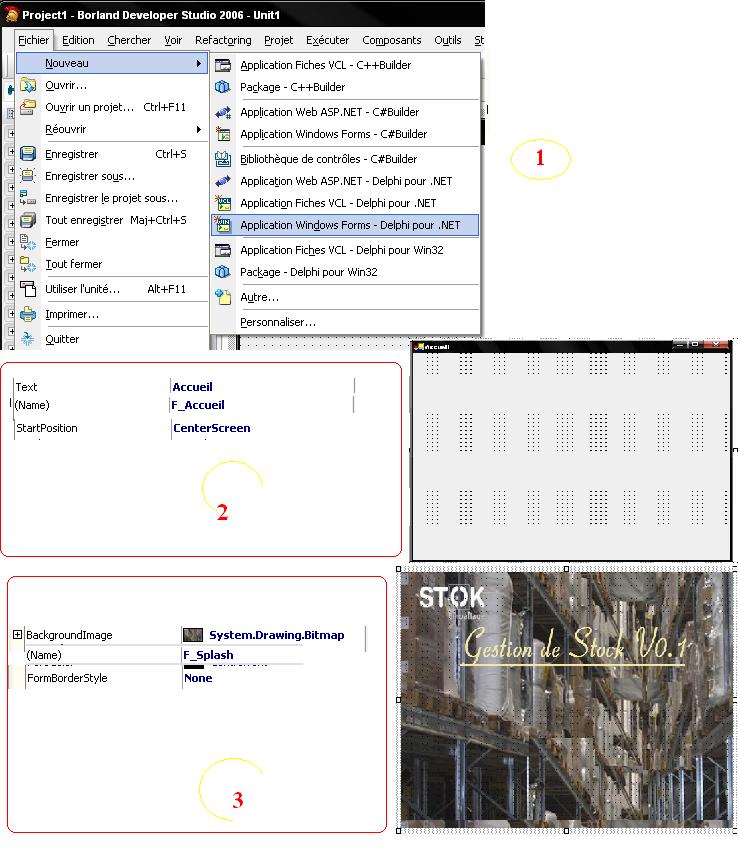
اليوم نتعلم كيف نعمل سبلاش بدلفي نت

1- انشاء مشروع جديد يحتوي على نافذتين ونغير في الخصائص التالية

2- نكتب هدا الكود في النافدة الاولي الرئيسة

unit Accueil;
interface
uses
  System.Drawing, System.Collections, System.ComponentModel,
  System.Windows.Forms, System.Data,
  System.Threading, Splash;
type
  F_Accueil = class(System.Windows.Forms.Form)
  {$REGION 'Code managé du concepteur'}
  strict private
	components: System.ComponentModel.IContainer;
	timer1: System.Windows.Forms.Timer;
	procedure DoSplash;
	procedure InitializeComponent;
  {$ENDREGION}
  strict protected
	procedure Dispose(Disposing: Boolean); override;
  private { Déclarations privées }
	vF_splash : F_splash;
  public
	constructor Create;
  end;
  [assembly: RuntimeRequiredAttribute(TypeOf(F_Accueil))]
implementation {$AUTOBOX ON}
{$REGION 'Code généré par le concepteur Windows Form'}


procedure F_Accueil.InitializeComponent;
begin
  Self.components := System.ComponentModel.Container.Create;
  Self.timer1 := System.Windows.Forms.Timer.Create(Self.components);
  //
  // timer1
  //
  Self.timer1.Interval := 5000;
  //
  // F_Accueil
  //
  Self.AutoScaleBaseSize := System.Drawing.Size.Create(5, 13);
  Self.ClientSize := System.Drawing.Size.Create(528, 408);
  Self.Name := 'F_Accueil';
  Self.StartPosition := System.Windows.Forms.FormStartPosition.CenterScreen;
  Self.Text := 'Accueil';
end;


{$ENDREGION}
procedure F_Accueil.Dispose(Disposing: Boolean);
begin
  if Disposing then
  begin
	if Components <> nil then
	  Components.Dispose();
  end;
  inherited Dispose(Disposing);
end;

procedure F_Accueil.DoSplash;
begin
			vF_Splash := F_splash.Create;
			//  F_splashإنشاء انستانس مكتسب من النافدة
			vF_Splash.ShowDialog();

end;

constructor F_Accueil.Create;
var
	  vThread  : Thread;
begin
	  inherited Create;
	  InitializeComponent;

	  vThread :=  Thread.Create(self.DoSplash);
		vThread.Start();
	  //لأنشاء سراد  - ثريد -  يقوم بعرض الصورة
	  Thread.Sleep(1000);
	  //
	  vThread.Abort();
	  vThread.Free;
	  // تحرير السراد من الداكرة
	  vF_Splash.Close;
	  //	  غلق الانستانس
	  vF_Splash.Free;
	  // تحريره
end;

end.

3- F9 للتنفيد

post-1034-1188204730_thumb.jpg

تم تعديل هذه المشاركة بواسطة زكيري عبد العالي في 27 أغسطس 2007 في 11:54

#3

معرفة مقياس العرض الحالي للوندوز


procedure TForm1[color= #339933;].BitBtn1Click[color= #009900;](Sender[color= #339933;]: TObject[color= #009900;])[color= #339933;];

begin

label1[color= #339933;].Caption[color= #339933;]:=Convert[color= #339933;].ToString[color= #009900;](Screen[color= #339933;].PrimaryMonitor[color= #339933;].Width[color= #009900;])[color= #339933;];

label2[color= #339933;].Caption[color= #339933;]:=Convert[color= #339933;].ToString[color= #009900;](Screen[color= #339933;].PrimaryMonitor[color= #339933;].Height[color= #009900;])[color= #339933;];

[color= #990000;]end[color= #339933;];
#4

1

مواضيع مشابهة