Asalam Alykom
I'll try inshallah to post series of basic-based lesson that allows a begginer to use OPENGL graphics library in very interesting way ..
Wait me :)
Asalam Alykom
I'll try inshallah to post series of basic-based lesson that allows a begginer to use OPENGL graphics library in very interesting way ..
Wait me :)
كما أريد أن أكون .. بأمر الله أكون
نحن بإنتظارك :)
و نحنا بالأنتظار
بس ....
لا تروحي تكتبيون بالأنكليزي مشكلة و المنتدى عربي ما هيك :)
Lesson (1) :
Setting Up OpenGL In Your System
Step 1: Getting OpenGL and related libraries.
You can download the Windows OpenGL SDK at the following URL:
http://www.berkelium.com/OpenGL/sgi-download.html
specifically this link,
ftp://ftp.meer.net/pub/gold/sgi-opengl/opengl2.exe (Mountain View, California)
The OpenGL Utility Toolkit (GLUT) is available from Nathan Robin's home page at the following URL:
http://www.cs.utah.edu/~narobins/glut.html
Step 2: Installing OpenGL and related libraries.
Under Windows:
This assumes you are using Microsoft Visual C++. If you are using a different compiler some specifics will be different.
A dynamically-linked library comes in three components. There is
1. a .dll file,
2. a .lib file for linking,
3. and a .h file for compilation.
We will be using three libraries: OpenGL, GLU, and GLUT. There are a total of nine files, then, that you must have on your system to use OpenGL:
Required OpenGL Files
File Typical Location
1.opengl32.dll c:\windows\system32
2.opengl32.lib c:\Program Files\Microsoft Visual Studio\VC98\Lib
3.opengl.h c:\Program Files\Microsoft Visual Studio\VC98\Include\GL
4.glu32.dll c:\ windows\system32
5.glu32.lib c:\Program Files\Microsoft Visual Studio\VC98\Lib
6.glu.h c:\Program Files\Microsoft Visual Studio\VC98\Include\GL
7.glut32.dll c:\ windows \system32
8.glut32.lib c:\Program Files\Microsoft Visual Studio\VC98\Lib
9.glut.h c:\Program Files\Microsoft Visual Studio\VC98\Include\GL
make sure that you put the following includes into your code (in this order):
#include <windows.h>
#include <GL/gl.h>
#include <GL/glut.h>
كما أريد أن أكون .. بأمر الله أكون
AA
العصاميه.. Thank you very much
cold0zero .. sorry I read your note after preparint the lesson ..
but I think it is written by an easy English language ..
Any way, I will translate to Arabic if you like ..
Regards ..
كما أريد أن أكون .. بأمر الله أكون
شكرا على الدرس
بالنسبة إلي ما في مشكلة بس شوفي المشرف على القسم كيف بيفضل
الدرس الأول :
تنصيب OPENGL على الجهاز
الخطوة الأولى : الحصول على ملفات OPENGL
يمكنك الحصول على ملفات OPENGL من هذا الموقع
و تحديداً من هنا
يمكنك الحصول كذلك على ملفات GLUT التابعة لــ OPENGL من هنا
الخطوة الثانية : تنصيب الملفات على الجهاز
هناك ثلاث أنواع للملفات ستحصل عليها
1. *.dll files
2. * .lib files for linking.
3.* .h files for compilation.
سيتم توزيعها على الجهاز كالتالي
1.opengl32.dll - c:\windows\system32
2.opengl32.lib - c:\Program Files\Microsoft Visual Studio\VC98\Lib
3.opengl.h - c:\Program Files\Microsoft Visual Studio\VC98\Include\GL
4.glu32.dll - c:\ windows\system32
5.glu32.lib - c:\Program Files\Microsoft Visual Studio\VC98\Lib
6.glu.h - c:\Program Files\Microsoft Visual Studio\VC98\Include\GL
7.glut32.dll - c:\ windows \system32
8.glut32.lib - c:\Program Files\Microsoft Visual Studio\VC98\Lib
9.glut.h - c:\Program Files\Microsoft Visual Studio\VC98\Include\GL
الآن الجهاز مستعد لتطبيقات OPENGL الممتعة و الرائعة .. :)
أريد أن أذكر أن الكود التالي يجب أنيكون في بداية أي تطبيق يستخدم OPENGL
#include <windows.h>
#include <GL/gl.h>
#include <GL/glut.h>
الدرس القادم سيكون عن كيفية رسم مكعب CUBE ..
تم تعديل هذه المشاركة بواسطة نحلة نشيطة في 19 يناير 2004 في 18:16
كما أريد أن أكون .. بأمر الله أكون
السلام عليكم ,,
لاأعرف كيف أشكرك أختي نحلة نشيطة ,, وكما قلت لكي سابقا موضوع ال OpenGl ,, نادر حقا وأتمنى أن تتابعي وتتحفينا بالمزيد ,, كان السكون يعم المنتدى الفترة السابقة نظرا للتغيرات التي طرأت عليه ,, لكننا الآن في الانتظار ,, وسأقوم بتنزيل الملفات المطلوبة بعد قليل ,, أرجو أن تستمري ..
بارك الله فيك ,,

NOTHING IS IMPOSSIBLE
السلام عليكم ...
و كل عام و الجميع ان شاء الله بخير .. :)
الاخت الكريمة النحلة النشيطة ( و القافية ماشية معي تمام .. :) ) ،، بارك الله فيكي و ان شاء الله تاخذي الاجر العظيم منه سبحانه و تعالى ،،،
بس عندي سؤال (و اعذريني عليه ،،، بس لأن الموضوع جديد علي) ..
ما المقصود بـ ( OPENGL ) .... مع الاعتذار ..
و السلام
بنت اليمن ،،،
لا اله الا الله .. محمد رسول الله
(* ربِ اجعلني مقيم الصلاة و من ذريتي ، ربنا و تقبل دعـاء *)
يا حيّ يا قيـوم ... برحمتك استغيث ... اصلح لي شأني كله و لا تكلني الى نفسي طرفة عين
موضوع شيق بالمناسبة بدأت أرى بوادر تطور بالمنتدى و لدي اقتراح أرجو ابداء الرأي فيه تحت الرابط :
http://www.arabteam2000.com/ib/index.php?s...ndpost&p=185848
تم تعديل هذه المشاركة بواسطة C&DEL في 1 فبراير 2004 في 02:27
مدونتي
حياكم الله
HGB .. سأكمل إن شاء الله فأنا لله الحمد و المنة قد أكملت عشرة دروس للمبتدئين منها الدرس الأول الذي عُرض هنا .. وقفت عند عملية الترجمة لأنني أعددتها باللغة الإنجليزية و لم أجد الوقت الكافي للترجمة لظروف الدراسة .. إنما سأطرحها هنا باللغة الإنجليزية و الدرس معظمه أوامر لذلك لا أتوقع صعوبة إن شاء الله و إن حصل فعلى عيني و رأسي أترجمه للجميع .. :) ..
بنت اليمن السعيد .. اللهم آمين و لا حرمنا الله من أجر العلم النافع .. الـOpenGl عبارة عن Graphical package يحتوي على مجموعة من الأوامر .. كل أمر تقريباً يختصر برنامج .. فعلى سبيل المثال لرسم مستطيل نحتاج إلى تعليمات على غرار moveto(x,y) lineto(x,y) و هكذا .. أما الــ Opengl فللسهولة و الاختصار فإنها تعطينا أمر واحد rectangle(x1,y1,x2,y2) .. الأوامر هنا كتبتها بصورتها الإفتراضية و ليس الفعلية .. و هو باكج رائع جدا لمصممى برامج الجرافيكس و الألعاب و في نفس الوقت سهل و سلس .. و ستبهرون أساتذتكم :) ..
C&DEL .. هأنذا موجودة .. و مع الدرس الثاني شدوا الهمة :) ..
.. على فكرة .. أنا لازلت مبتدئة في كل من VC++ و Opengl .. لذلك سنتساعد جميعا في عملية الدروس :) ..
.. كذلك أجد صعوبة كبيرة في ادراج رد في المنتدى !!
كما أريد أن أكون .. بأمر الله أكون
LESSON (2) :
Parts of opengl program
This is one possibility for dividing OpenGL programming code.
1. Includes:
#include <GL/glut.h> /* Header File For The GLUT Library */
2. display:
The drawing code is represented by DrawGLScene() function.
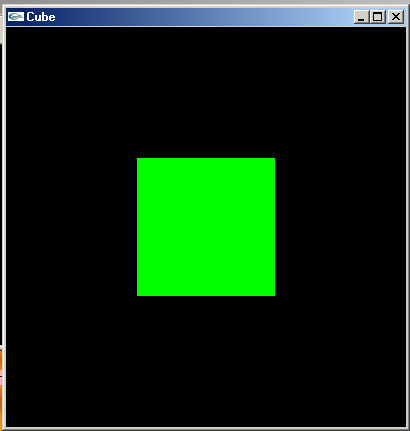
To draw a green cube , we will use two commands: " glColor3f(R,G,B) and "glutSolidCube(size)" .
GLvoid DrawGLScene()
{
  glClear(GL_COLOR_BUFFER_BIT |
          GL_DEPTH_BUFFER_BIT);/* Clear The Screen And The Depth Buffer */
  glLoadIdentity();
  glTranslatef(0.0,0.0,-6.0);  /* go away from the camera a little bit  */

  /* Starting cube drawing  */
   glColor3f(0.0f, 1.0f, 0.0f);         // The cube is green.
   glutSolidCube(1.5f);                 //draw cube
   glFlush();
}
3. Main routine:
Your main() should look like this: we will not discuss the initializing commands in details in this stage.
int main(int argc, char **argv)
{

/* Initialisation and window creation */
glutInit(&argc, argv);                               /* Initialize GLUT state. */
glutInitDisplayMode(GLUT_RGBA |               /* RGB and Alpha */
                           GLUT_SINGLE|             /* Single buffer */
                           GLUT_DEPTH);             /* Z buffer (depth) */
glutInitWindowSize(400,400);                    /* set initial window size. */
glutInitWindowPosition(0,0);                      /* upper left corner of the screen. */
glutCreateWindow("Cube");                        /* Create a window with a title. */

/* A general OpenGL initialization function. Sets all of the initial parameters. */
glClearColor(0.0, 0.0, 0.0, 0.0);                    /* Clear The Background Color */
glViewport(0, 0, 400, 400);                          /* Set the viewport */
glMatrixMode(GL_PROJECTION);                    /* Select the projection matrix */
glLoadIdentity();                                       /* Reset The Projection Matrix */
gluPerspective(45.0,1,0.1,100.0);
glMatrixMode(GL_MODELVIEW);                    /* Switch back to the modelview matrix */

/* Now register the various callback functions */
glutDisplayFunc(DrawGLScene);                    /* Function to do all our OpenGL drawing. */

/* Now drop into the event loop from which we never return */
glutMainLoop(); /* Start Event Processing Engine. */

}
Try to write the code yourself , if you face any Difficulties , here is the source code try it :
كما أريد أن أكون .. بأمر الله أكون
مشكورة على الجهد نحولتي العزيزة ....... بس بتعرفي يمكن أنا أعرفك وجها لوجه أسلوبك بالمشاركة بالمنتدى شبه مألوف لدي ما هيك أم تخميني بغير محله
مدونتي
السلام عليكم ,,
رائع أختي نحلة نشيطة ,, بداية موفقة ,, ونحن هنا أيضا في دروس تعلم جماعي ,, لذا على كل الراغبين في التعلم المحاورة ومحاولة ابتداع الآراء والمساعدة ,,
وسأبدأ أنا :
أولا بالنسبة لتنزيل الملفات فملفات ال opengl ثلاثة أنواع وهس ال dll وال .h و ال .lib ,, بالنسبة لل dd فهي موجودة في ال Windowsp بشكل افتراضي ماعدا ال Glut32.dll ,, أيضا كل من ملفات ال .h وال .lib ماعدا الخاصة بال GLUT وهي المكتبة المساعدة التي تقوم مكان العرض ,, فتقوم بانشاء النافذة وتجهيز وضعية العرض ,, وبعض الامور الاخرى ,,
ملاحظة مكان تنزيل ال openGL sdk ,, ومكان تنزيل ال GLUT منفصلان عن بعضهما كما وضحت نحلة نشيطة في البداية ,,
وال OpenGL مشابه تماما تقريبا لل Direct3D فقط بعض الفروق البسيطة ,,
عموما تجهيز النافذة لاستضافة البرنامج ,, والامور المساعدة في ال OpenGl يمكن تجهيزها بسهولة أكبر من تلك التي في ال Direct3D ,, وبدل من مكتبة ال Glut في ال OpenGL لدا ال Direct3D مايدعى بال FrameWork ,, وهي بنية كاملة أو قالب للأمور الاساسية والابتدائية في أي برنامج Direct3D ,,
بالنسبة للفروق بين ال Direct3D وال OpenGL ,, فيوجد فرقان الاول لصالج ال Direct3D ولاآخر لصلح ال OpenGL ,,
حيث Direct3D هي جزء من مكتبة متكملة خاصة بالوندوز وهي ال DirectX وبها مكتابات أخرى خاصة بالصوت والفيديو والتحكم بعصى الألعاب وغيرها ,,
أما ال OpenGl يمكن مقارنتها بال Direct3D لكن تتميز عنها أنه يمكن تشغيل البرامج المكتوبة بها على اللينكس أو الوندوز وحتى الماك ,,
بالنسبة لفروق الاداء بين ال OpenGL وال Direct3D لاأعتقد بوجود فروق ,, لأنني قد قرأت سابقا ذلك , لكن لم أصل لفروق تذكر في الاداء ,,
,,,,,,,,,,,,,,,,,,,,,,,,,,,,,,,,,,,,,,,,,,,,,,,,,
بالنسبة للكود فيحتاج لتفصيل أكبر ,, لكن في البداية لابأس فلنعرف فقط كيف يمكن تشغيل البرامج وكتابة أكواد بسيطة ,,
عموما نزلت الملفات في أماكنها التي ذكرتها أختنا النحلة النشيطة ,, وعمل البرنامج بشكل جيد معي ,,
وكل الكود المكوجود في ال main خاص بتجهيزات الابتداء ,, ماعدا استدعاء الدالة ,,
glutDisplayFunc(DrawGLScene);
وفي الدالة الكود الخاص برسم المكعب الذي لن يظهر بكامله حيث سيظهر وجه واحد فقط منه على شكل مربع ,, لأن الكاميرا حاليا تشير باتجاه وجه واحد منه ,,
الكود الخاص برسم المكعب هو :
 /* Starting cube drawing  */
  glColor3f(0.0f, 1.0f, 0.0f);         // The cube is green.
  glutSolidCube(1.5f);                 //draw cube
الى الجلسة التالية ننتظر الاسئلة ,, بارك الله فيكم ,,
NOTHING IS IMPOSSIBLE
HGB .. بارك الله فيك .. أنت رائع ..
أوّد أن أضيف أن هناك الـ OpenAl و هى مكتبة خاصة بالصوت أكثر من رائعة تساند الـ OpenGl و تضفي الكثير من reality للبرنامج ..
.. على فكرة لن أدخل في تفاصيل الأوامر فهذا من وجهة نظري مدعاة للتشتيت في هذه المرحلة ..
C&DEL .. أشكرك أخي الكريم .. لا أدري أخي إن كنت أعرفك وجها لوجه .. إن كان اسمك الحقيقي بشير النعيمي فأنا حتما لا أعرفك ..
كما أريد أن أكون .. بأمر الله أكون
Lesson (3) : Lighting in OpenGl
Here we will add lights for our cube. Opengl gives us the opportunity to light our objects by different kinds of lights such as : diffuse, specular , spotlight. In this stage we'll just know the commands that add lights to our code without going deeper in the details of that commands.
1. Includes: Same as lesson(2)
We will define the following :
// Light properties for the diffuse light, specular light, and light position//
float diffuseLight[] = { 0.8f, 0.8f, 0.8f, 1.0f };
float specularLight[] = { 1.0f, 1.0f, 1.0f, 1.0f };
float LightPosition[] = { 0.4f, 0.0f, 8.0f, 1.0f };
2. display :Same as lesson(2)
3. Main routine : Here we will enable lighting.
int main(int argc, char **argv)
{

/* Initialisation and window creation */

glutInit(&argc, argv); /* Initialize GLUT state. */

glutInitDisplayMode(GLUT_RGBA | /* RGB and Alpha */
GLUT_SINGLE| /* Single buffer */
GLUT_DEPTH); /* Z buffer (depth) */

glutInitWindowSize(400,400); /* set initial window size. */
glutInitWindowPosition(0,0); /* upper left corner of the screen. */
glutCreateWindow("Cube"); /* Create a window with a title. */

/* A general OpenGL initialization function. Sets all of the initial parameters. */

glClearColor(0.0, 0.0, 0.0, 0.0); /* This Will Clear The Background Color To Black */
glViewport(0, 0, 400, 400); /* Set the viewport */
glMatrixMode(GL_PROJECTION); /* Select the projection matrix */
glLoadIdentity(); /* Reset The Projection Matrix */
gluPerspective(45.0,1,0.1,100.0); /* Calculate The Aspect Ratio Of The Window */
glMatrixMode(GL_MODELVIEW); /* Switch back to the modelview matrix */

glShadeModel(GL_SMOOTH); // Smooth shading in our scenes.
glEnable(GL_DEPTH_TEST); // Enable desth testing for hidden surface removal.
glEnable(GL_LIGHTING); // Enable lighting.


// Here we will set up a spotlight light source in our scene. This light will shine on
// the objects giving them a nicer look than a plain dull color. This stuff has nothing
// to do with the tutorial it self but only to make things look better.
glLightfv(GL_LIGHT0, GL_DIFFUSE, diffuseLight);
glLightfv(GL_LIGHT0, GL_SPECULAR, specularLight);
glLightfv(GL_LIGHT0, GL_POSITION, LightPosition);
glLightf(GL_LIGHT0, GL_SPOT_CUTOFF, 10.0f);
glLightf(GL_LIGHT0, GL_SPOT_EXPONENT, 75.0f);

// Enable our light.
glEnable(GL_LIGHT0);

// Set up the material information for our objects. Again this is just for show.
glEnable(GL_COLOR_MATERIAL);
glColorMaterial(GL_FRONT, GL_AMBIENT_AND_DIFFUSE);
glMaterialfv(GL_FRONT, GL_SPECULAR, specularLight);
glMateriali(GL_FRONT, GL_SHININESS, 128);
/* Now register the various callback functions */

glutDisplayFunc(DrawGLScene); /* Function to do all our OpenGL drawing. */

/* Now drop into the event loop from which we never return */
glutMainLoop(); /* Start Event Processing Engine. */
}
Done ! :)
Source code as usual :
كما أريد أن أكون .. بأمر الله أكون
السلام عليكم جميع :
نحلة نشيطة ...... عفوا حدث سوء تفاهم ظننت بأنك احد أصدقائي بالكلية بالرغم من أن أسلوبك بالمشاركة شبيه لحد كبير به ..... على كل الأحوال أنا سعيد بالتعرف عليك(ي) ... اسمي الحقيقي محمد بشير النعيمي الحسيني
نحلة خانم ... لماذا لا تشارك بالمنتدى و تكتفي بوضع الدروس فقط ؟؟؟؟
بما أنك بدأت بكتابة دروس بالOpenGL أرجو أن تشارك بالرابط التالي :
http://www.arabteam2000.com/ib/index.php?s...ndpost&p=186275
مدونتي
هذا الموضوع مغلق.