أصدقاؤنا المبرمجون أقدم لكم أخِر ما توصلت له من التعامل مع الجداول المترابطة في ado.net 2005 على شكل درس متواضع ، ولكن ينقصني الأهم وهو الإضافة والحذف والحفظ والتعديل وهوا ما أتمنى أن يكمله خبرائنا في المنتدى ..
بسم الله الرحمن الرحيم
فكرة البرنامج تقوم على أساس حفظ الاسئله والأجوبة وإمكانية البحث عنها بكل سهولة ويسر . نحتاج في البداية إلى صنع ملف قاعدة بيانات بواسطة برنامج Microsoft Office Access 2003 وليحمل اسم InformationBank.mdb حيث نصنع جدولين :
1- جدول اسمه TheBank يحتوي على الحقلين التاليين ( ID "AotoNumber" + Number "Number" )
2- جدول اسمه Data يحتوي على الحقول التالية ( ID " Number " + Ask "Text" + Answer "Text" ) .
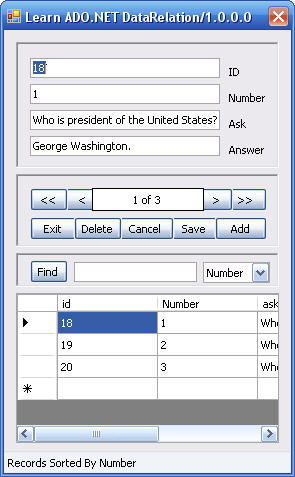
كي نكون فكره عن شكل البرنامج في وضع التصميم فل نشاهد هذه الصورة :
نحتاج إلى:
1-Button 10 على النحو التالي ( btnMoveFirst للانتقال للسجل الأول + btnMoveNext للانتقال للسجل التالي + btnMovePrevious للانتقال للسجل السابق + btnMoveLast للانتقال للسجل الأخير + btnFind للبحث عن السجلات + btnAdd لإضافة سجل جديد + btnSave لحفظ سجل جديد أو تحديث بيانات مخزنة + btnDelete لحذف سجل + btnExit للخروج من البرنامج + btnCancel لإلغاء عملية الإضافة أو التعديل على البيانات )
2- TextBox 6 على النحو التالي ( txtFind لكتابة جملة البحث + txtid + txtnumber + txtask + txtanswer )
3- ComboBox 1 لتحديد طريقة فرز البيانات إما برقم السؤال أو بالسؤال أو الجواب.
4- ToolStripStatusLabel 1 لإيضاح الحالة التي عليها البرنامج .
5 – Label 5 على النحو التالي (Id للتعريف عن حقل المفتاح الأساسي+ number للتعريف عن رقم السؤال + Ask للتعريف عن السؤال+ Answer للتعريف عن الإجابة+ lblPosition للتعريف عن رقم السجل الحالي من العدد الكلي للسجلات (
6- DataGridView 1 لعرض البيانات في جدول .
الكود الذي سوف نحتاج إليه :
ننتقل إلى شاشة عرض الكود
في البداية نحتاج إلى استدعاء فضاء الأسماء الخاص بقواعد بيانات Microsoft Office Access وذلك بكتابة العبارة التالية في بداية شاشة الكود :
Imports System.Data
Imports System.Data.OleDb
بعد ذلك نحتاج إلى التصريح عن بعض المتغيرات الضرورية " سوف نشرحها في وقتها إن أمكن " وذلك تحت العبارة Public Class Form1 :
	Friend strConn As String  = "Provider=Microsoft.Jet.OLEDB.4.0;Data Source=" & Application.StartupPath & "\InformationBank.mdb;User Id=admin;Password=;"
	Friend strSQL As String = "SELECT TheBank.id, TheBank.Number, data.ask, data.answer FROM TheBank INNER JOIN data ON TheBank.ID = data.ID ORDER BY TheBank.Number;"
	Friend cn As New OleDbConnection(strConn)
	Friend daTheBankAndData As New OleDbDataAdapter(strSQL, cn)
	Friend MyDS As DataSet
	Friend MyDataView As DataView
	Friend MyCurrencyManager As CurrencyManager
	Friend intOption As Byte = 0
	Dim strSearch As String
بعد ذلك نقوم بكتابة الكود التالي في حدث Form1_Load :
		Me.Text = Application.ProductName & "/" & Application.ProductVersion
		cn.Open()
		' Fill the DataSet and bind the fields...
		Call FillDataSetAndView()
		Call BindFields()
		' Show the current record position...
		Call ShowPosition()
		' Add items to the combo box...
		cboField.Items.Add("Number")
		cboField.Items.Add("Ask")
		cboField.Items.Add("Answer")
		' Make the first item selected...
		cboField.SelectedIndex = 0
يلي ذلك نقوم بكتابة كود الإجراءات الفرعية التي ذكرناها في حدث Form1_Load وهي Call FillDataSetAndView و Call BindFields و Call ShowPosition :
	Private Sub FillDataSetAndView()
		Try
			' Initialize a new instance of the DataSet object...
			MyDS = New DataSet()
			' Fill the DataSet object with TheBankAndData...
			daTheBankAndData.Fill(MyDS, "TheBankAndData")
			' Set the DataView object to the DataSet object...
			MyDataView = New DataView(MyDS.Tables("TheBankAndData"))
			' Set our CurrencyManager object to the DataView object...
			MyCurrencyManager = CType(Me.BindingContext(MyDataView), CurrencyManager)
			cn.Close()
		Catch ex As Exception
			MessageBox.Show(ex.Message, " Fill the DataSet and bind the fields... ", MessageBoxButtons.OK, _
			MessageBoxIcon.Information, MessageBoxDefaultButton.Button1, _
			MessageBoxOptions.RtlReading)
		End Try
	End Sub
	Sub BindFields()
		' Clear any previous bindings...
		txtid.DataBindings.Clear()
		txtnumber.DataBindings.Clear()
		txtask.DataBindings.Clear()
		txtanswer.DataBindings.Clear()
		' Add new bindings to the DataView object...
		txtid.DataBindings.Add(New Binding("Text", MyDataView, "id"))
		txtnumber.DataBindings.Add(New Binding("text", MyDataView, "number"))
		txtask.DataBindings.Add(New Binding("text", MyDataView, "ask"))
		txtanswer.DataBindings.Add(New Binding("text", MyDataView, "answer"))
		' Add new bindings to the DataGridView object...
		DataGridView1.AutoGenerateColumns = True
		DataGridView1.DataSource = MyDS
		DataGridView1.DataMember = "TheBankAndData"
		' Display a ready status...
		ToolStripStatusLabel1.Text = "Ready"
	End Sub
	Private Sub ShowPosition()
		' Display the current position and the number of records
		lblPosition.Text = MyCurrencyManager.Position + 1 & _
		" of " & MyCurrencyManager.Count()
	End Sub
وللابحار بين السجلات والتنقل بينها نقوم بالأتي :
1 - للانتقال إلى أول سجل نكتب الكود التالي في حدث الزر btnMoveFirst_Click :
		' Set the record position to the first record...
		MyCurrencyManager.Position = 0
		' Show the current record position...
		ShowPosition()
2 - للانتقال إلى السجل التالي نكتب الكود التالي في حدث الزر btnMoveNext_Click :
		' Move to the next record...
		MyCurrencyManager.Position += 1
		' Show the current record position...
		ShowPosition()
3 - للانتقال إلى السجل السابق نكتب الكود التالي في حدث الزر btnMovePrevious_Click :
		' Move to the previous record...
		MyCurrencyManager.Position -= 1
		' Show the current record position...
		ShowPosition()
4 - للانتقال إلى السجل الأخير نكتب الكود التالي في حدث الزر btnMoveLast_Click :
		' Set the record position to the last record...
		MyCurrencyManager.Position = MyCurrencyManager.Count - 1
		' Show the current record position...
		ShowPosition()
ولفرز السجلات تصاعديا على حسب أرقام الأسئلة أو الأسئلة نفسها أو الأجوبة نقوم بكتابة الكود التالي في حدث cboField_SelectedIndexChanged :
		' Determine the appropriate item selected and set the
		' Sort property of the DataView object...
		Select Case cboField.SelectedIndex
			Case 0 'Number Name
				MyDataView.Sort = "number"
				ToolStripStatusLabel1.Text = "Records Sorted By Number"
			Case 1 'ask
				MyDataView.Sort = "ask"
				ToolStripStatusLabel1.Text = "Records Sorted By Ask"
			Case 2 'answer
				MyDataView.Sort = "Answer"
				ToolStripStatusLabel1.Text = "Records Sorted By Answer"
		End Select
		' Call the click event for the MoveFirst button...
		btnMoveFirst_Click(Nothing, Nothing)
		' Display a message that the records have been sorted...
وللبحث عن سجل معين نكتب الكود التالي في حدث btnFind_Click :
		If txtFind.Text = "" Then
			ToolStripStatusLabel1.Text = "Write Any Text For Search"
			cboField_SelectedIndexChanged(Nothing, Nothing)
			Exit Sub
		End If
		' Declare local variables...
		Dim intPosition As Integer
		Call Search()
		'MyDataView.RowFilter = "ask like('" + Trim(txtFind.Text) + "%')"
		intPosition = MyDataView.Find(strSearch)
		strSearch = Nothing
		If intPosition = -1 Then
			' Display a message that the record was not found...
			ToolStripStatusLabel1.Text = "Record Not Found"
		Else
			' Otherwise display a message that the record was
			' found and reposition the CurrencyManager to that
			' record...
			ToolStripStatusLabel1.Text = "Record Found"
			MyCurrencyManager.Position = intPosition
		End If
		' Show the current record position...
		ShowPosition()
ثم نكتب كود الإجراء الفرعي الذي ذكرناه في حدث btnFind_Click وهو Search :
		Dim sql2 As String
		Dim da2 As New OleDb.OleDbDataAdapter
		Dim ds2 As New DataSet
		Select Case cboField.SelectedIndex
			Case 0 'Number
				MyDataView.Sort = "Number"
				sql2 = "SELECT TheBank.id, TheBank.Number, data.ask, data.answer FROM TheBank INNER JOIN data ON TheBank.ID = data.ID where TheBank.Number like ('" + Trim(txtFind.Text) + "%');"
				cn.Open()
				da2.SelectCommand = New OleDbCommand(sql2, cn)
				ds2 = New DataSet("TheBankAndData")
				If cn.State = ConnectionState.Open Then
					da2.MissingSchemaAction = MissingSchemaAction.AddWithKey
					da2.Fill(ds2, "TheBankAndData")
				End If
				If ds2.Tables("TheBankAndData").Rows.Count <> 0 Then strSearch = ds2.Tables("TheBankAndData").Rows(0)("Number")
			Case 1 'Ask
				MyDataView.Sort = "ask"
				sql2 = "SELECT TheBank.id, TheBank.Number, data.ask, data.answer FROM TheBank INNER JOIN data ON TheBank.ID = data.ID where data.ask like ('" + Trim(txtFind.Text) + "%');"
				cn.Open()
				da2.SelectCommand = New OleDbCommand(sql2, cn)
				ds2 = New DataSet("TheBankAndData")
				If cn.State = ConnectionState.Open Then
					da2.MissingSchemaAction = MissingSchemaAction.AddWithKey
					da2.Fill(ds2, "TheBankAndData")
				End If
				If ds2.Tables("TheBankAndData").Rows.Count <> 0 Then strSearch = ds2.Tables("TheBankAndData").Rows(0)("ask")
			Case 2 'Answer
				MyDataView.Sort = "Answer"
				sql2 = "SELECT TheBank.id, TheBank.Number, data.ask, data.answer FROM TheBank INNER JOIN data ON TheBank.ID = data.ID where data.answer like ('" + Trim(txtFind.Text) + "%');"
				cn.Open()
				da2.SelectCommand = New OleDbCommand(sql2, cn)
				ds2 = New DataSet("TheBankAndData")
				If cn.State = ConnectionState.Open Then
					da2.MissingSchemaAction = MissingSchemaAction.AddWithKey
					da2.Fill(ds2, "TheBankAndData")
				End If
				If ds2.Tables("TheBankAndData").Rows.Count <> 0 Then strSearch = ds2.Tables("TheBankAndData").Rows(0)("answer")
		End Select
		cn.Close()
		sql2 = Nothing
		da2.Dispose()
		ds2.Dispose()
ولتنفيذ أمر البحث بمجرد ألكتابه على لوحة المفاتيح نقوم بكتابة الكود التالي في الحدث txtFind_TextChanged :
btnFind_Click(Nothing, Nothing)
وللخروج من البرنامج نكتب الكود التالي في حدث btnExit_Click :
		Dim response As MsgBoxResult
		ToolStripStatusLabel1.Text = "Exit program?"
		response = MsgBox("Exit program?", vbYesNo)
		If response = vbYes Then
			End
		Else
			ToolStripStatusLabel1.Text = "Ready"
		End If
الحمد لله الذي أعانني على كتابة هذا الدرس الذي أتمنى أن يكمله غيري وان يستفيد منه الكثير .
أرجو أيضا أن تكون المشاركة التالية إما شرح أو استفسار أو إضافة على الكود والله الموفق .
;)