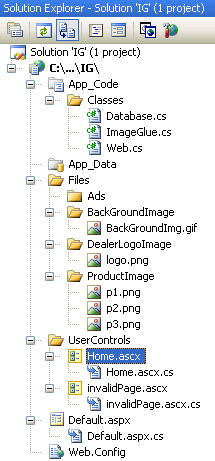
هيك الويكند بيكون خلص ضاع .. عموما نرجع للكود قبل ما اكمل مشاوير اليوم ..
الان وضعت أجزاء كبيرة من كلاس الرسم و سوف أعود لاحقا لأشرح بعض النقاط فيه و لكن لننتبه
هناك نقطة وهي عند عمل دوران للأشكال البيضاوية يحصل إزاحة للكائن وبالتالي لجأنا لل GDI+ لتطبيق بعض خوارزميات ال Transformation
هنا الشكل البدائي لكلاس ImageGlue.cs
using System;
using System.Data;
using System.Configuration;
using System.Web;
using System.Web.Security;
using System.Web.UI;
using System.Web.UI.WebControls;
using System.Web.UI.WebControls.WebParts;
using System.Web.UI.HtmlControls;
using WebSupergoo.ImageGlue6;
using WebSupergoo.ImageGlue6.GDIPlus;
using System.Drawing.Drawing2D;
using System.Drawing.Imaging;
using System.Drawing;
///
///  <-- Drawing class based on ImageGlue.NET -->
/// This Code Is written By Mohammed K.
///


public class ImageGlue
{
	Canvas ca;
	CanvasWrapper wr;
	Graphics gr;
	Pen pn;
	string imgPath, adsPath, backgroundImg;

	public ImageGlue()
	{
		imgPath = Web.GetWebConfigValue("PhoneImagePath");
		adsPath = Web.GetWebConfigValue("AdsImagePath");
		backgroundImg = Web.GetWebConfigValue("BackGroundImagePath");
		ca = new Canvas();
		wr = new CanvasWrapper();
	}
	public void LoadImage(string imgUrl, float width, float height)
	{
		ca.DrawFile(HttpContext.Current.Server.MapPath(imgUrl), " Size=" + width.ToString() + "," + height.ToString());
	}

	public void DrawText(string Text, float x, float y, float width, float height, string TextColor, string TextFont, float TextSize, string TextStyle)
	{
		ca.DrawText(Text, "Pos=" + x + "," + y + " Size=" + width.ToString() + "," + height.ToString() + " TextColor=" + TextColor + " TextFont='" + TextFont + "' TextSize=" + TextSize + (TextStyle.Equals("") ? "" : " TextStyle=" + TextStyle));
	}
	public void DrawText(string Text, float x, float y, string TextColor, string TextFont, float TextSize, string TextStyle)
	{
		ca.DrawText(Text, "Pos=" + x + "," + y + " TextColor=" + TextColor + " TextFont='" + TextFont + "' TextSize=" + TextSize + (TextStyle.Equals("") ? "" : " TextStyle=" + TextStyle));
	}

	public void DrawOval(float x, float y, float width, float height, Color paintColor, float rotate, int alpha)
	{
		// pure GDI+ code // I had problems with ImageGlue.NET in this point, so I have used GDI+ here
		gr = wr.Wrap(ref ca);
		gr.SmoothingMode = SmoothingMode.HighQuality;
		gr.PixelOffsetMode = PixelOffsetMode.HighQuality;

		double fangle = (double)rotate / 180 * 3.1415926;
		Matrix xform = new Matrix((float)Math.Cos(fangle)
		, (float)Math.Sin(fangle)
		, (float)-Math.Sin(fangle)
		, (float)Math.Cos(fangle)
		, (float)((x + (width / 2)) - Math.Cos(fangle) * (x + (width / 2)) + Math.Sin(fangle) * (y + (height / 2)))
		, (float)((y + (height / 2)) - Math.Cos(fangle) * (y + (height / 2)) - Math.Sin(fangle) * (x + (width / 2))));
		gr.Transform = xform;

		SolidBrush b = new SolidBrush(Color.FromArgb(alpha, paintColor));
		gr.FillEllipse(b, x, y, width, height);

		ca = wr.Unwrap(ref gr);
	}


	public void AddTransparentImage(string inPath, float x, float y)
	{
		ca.DrawFile(HttpContext.Current.Server.MapPath(inPath), "Mode=transparent Pos=" + x + "," + y);
	}
	public void AddTransparentImage(string inPath, float x, float y, float width, float height)
	{
		ca.DrawFile(HttpContext.Current.Server.MapPath(inPath), "Mode=transparent Size=" + width.ToString() + "," + height.ToString() + " Pos=" + x + "," + y);
	}

	public void ResizeImage(string inPath, string outPath, int height, int width)
	{
		ca.Clear();
		ca.DrawFile(HttpContext.Current.Server.MapPath(inPath), "height<" + height + ", width<" + width);
		ca.SaveAs(HttpContext.Current.Server.MapPath(outPath), "");
		ca.Clear();
	}

	public void SaveAsImage(string imgUrl)
	{
		ca.SaveAs(HttpContext.Current.Server.MapPath(imgUrl), "Quality=100.0");
	}
	public void SaveAsImage(string imgUrl, string param)
	{

		ca.SaveAs(HttpContext.Current.Server.MapPath(imgUrl), param);
	}

	public void SaveAsPDF(string PDFUrl)
	{
		this.SaveAsImage(PDFUrl);
	}

	public void Close()
	{
		ca.Clear();
		ca.Dispose();
	}
}
نرى أن هناك ثوابت لمسارات معينة يتم إعادتها من خلال كلاس Web.Cs والموجودة بداخل Web.Config على الشكل التالي و طبعا داخل
التاج Configuration
  <appSettings>
	<add key="localhost.DatabaseConnectionString2" value="server=(Local); database=IG_Db; trusted_connection=true; pooling=false;"/>
	<add key="localhost.SmtpServer" value="127.0.0.1"/>
	<add key="ProductImagePath" value="Files/ProductImage/"/>
	<add key="AdsImagePath" value="Files/Ads/"/>
	<add key="BackGroundImagePath" value="Files/BackGroundImage/"/>
	<add key="DealerLogoPath" value="Files/DealerLogoImage/" />

  </appSettings>
أيضا مسار قاعدة البيانات موجود ..
إلى هنا أعتقد أنا أوفيت بوعدي اللي هو الاسراع في هذا المشروع في الويكند .. صح؟
بالتوفيق للجميع
You can fly while you can touch the sky