الفريق العربي للبرمجةأرشيف المنتديات · 2000 – 2023
نسخة أرشيفية للقراءة فقط — التسجيل والمشاركة مغلقان، والمحتوى محفوظ كما كان.

Pet Store

بدأه مخالف_66 في 17 يونيو 2008 · 20 رد · 2,134 مشاهدة · في JavaSE
مشاركة: واتساب X فيسبوك تيليجرام
#1 صاحب الموضوع

اذا ممكن تساعدوني في ترتيب افكاري & الاكواد انا بدات في عمل

مازلت مشوشة

الفكرة عبارة عن

محل حيوانات

يقدر user

يعمل

add , display ,clear and exit

بالعناصر اللي عندة الموجودة في array

pet name , animal type, breed and colour

a]

1- use only one frame for this program

2- use only one array to store the pet information

b]

1- the program can display individual pets info

2- the program can store all pets info

3- the program can capture the imge of pet and display

4- any other features (edite- delete)

import java.awt.*;

import java.awt.event.*;

public class pet1 extends Frame implements ActionListener

{

pet1 obj[];

static int count = 0;

Button button1, button2, button3, button4;

public pet1()

{

super("PETS");

obj = new pet1[50];

}

public void addComponents()

{

//addComponent("South", new Button("South"));

button1 = new Button("ADD");

button2 = new Button("DISPLAY");

button3 = new Button("CLEAR");

button4 = new Button("EXIT");

add(button1, "South");

add(button2, BorderLayout.SOUTH);

add(button3, BorderLayout.SOUTH);

add(button4, BorderLayout.SOUTH);

pack();

setVisible(true);

button1.addActionListener(this);

//button2.addActionListener(this);

//button3.addActionListener(this);

//button4.addActionListener(this);

}

public void add()

{

TextField tx1 = new TextField(20);

TextField tx2 = new TextField(20);

TextField tx3 = new TextField(20);

TextField tx4 = new TextField(20);

Label colour = new Label("Colour");

Button done = new Button(" Done ");

Button clear = new Button(" Clear ");

supe("ADD");

setLayout(new GridLayout(5,2));

add(new Label(" Name "));

add(tx1);

add(new Label(" Type "));

add(tx2);

add(new Label(" Bead "));

add(tx3);

add(colour);

add(tx4);

add(done);

add(clear);

done.addActionListener(this);

clear.addActionListener(this);

obj[count].name = tx1.getText();

obj[count].type = tx2.getText();

obj[count].bead = tx3.getText();

obj[count].colour = tx4.getText();

count++;

pack();

show();

}

public void actionPerformed(ActionEvent e)

{

if (e.getSource() == button4)

{

setVisible(false);

dispose();

System.exit(0);

}

else

if (e.getSource() == button1)

add();

}

public static void main(String[] arg)

{

pet1 p = new pet1();

p.addComponents();

//pet1 p1 = new pet1("ADD");

//p1.add();

}

}

#2

عفوا انا لسا ما جربت الكود

بس ممكن اعرف شو يلي بدك نساعدك في تمام

ترتيب الكود ولا في مشكلة ما عم تزبط

ready to do full students projects

digitalscenter@hotmail.com

+966530357742

#3

سلام ما المشكل ? و هل ستستعمل awt or swing or consol

image-27.gif

concepteur realisateur java j2ee

php5 and asp

#4

عفوا اخ man4maya

ولكن يبدو من الكود ومن الوصف انها تريد ان تستعمل frame واحدة

والمكتبة awt

ready to do full students projects

digitalscenter@hotmail.com

+966530357742

#5

مشكورين لاهتمامكم

انا اشتغل على awt

محتاجة frame

اساسي وهذا الفريم يحتوي على

button

و هذي ال button

تحوي اسم الدوال الاخرى(add,display,delete,clear,exit)

وكل button

ينقلني ل frame

باسم الدالة

اتمنى شرحي يكون واضح

"والحين ودي لو تشوفون لي هذا الكود "وش هي مشكلتة

حاولت بس ما عرفت

وبعدين انا بكمل علية وابيكم تشرفون علية يمكن يزبوط

وجزاك الله خير

#6

الكلاس pet1 ينقصه تعريف مجموعة الـ Attributs التي قمتي باستعمالها في الميثود add :

obj[count].name = tx1.getText();
obj[count].type = tx2.getText();
obj[count].bead = tx3.getText();
obj[count].colour = tx4.getText();

ثاني شيء، عند اضافة الــ buttons إلى الفرايم، لا نشاهد إلا المضاف أخيرا. اذن اعيدي النظر في كيفية اضافتها.

كنصيحة جانبية، حاولي أن لا تمزجي بين الكلاس الذي ينمذج المعطيات والكلاسات الخاصة بالعرض. قومي بتصميم كلاس يخزن المعلومات التي ذكرتيها، مثلا :

public class Pet {
	private String name;
	private String type;
	private String breed;
	private String color;

public Pet(String name, String type, String breed, String color) {
	this.name = name;
	this.type = type;
	this.breed = breed;
	this.color = color;
}

public void setName(String name) {
	this.name = name;
}
public String getName() {
	return this.name;
}

// and all other getters and setters...

}

واستعملي هذا الكلاس في كلاس آخر خاص بالعرض (Frame).

فنجد مثلا ضمن هذا الكلاس، جدول من الكلاس المعرف سابقا.

public class PetFrame extends Frame implements ActionListener {

	private Pet objs[];
	static int count = 0;

	// ...

}

والبقية إليك.

بالتوفيق

تم تعديل هذه المشاركة بواسطة delab في 18 يونيو 2008 في 00:12

#7

شكرا لكل من حاول يساعدني بالاخص

delab

ما قصرت جزاك الله خير

وانا بكمل شغلي و اتمنى يبقى تكملون معي المشوار لمن اخلص

#9

والله شكلة حلو

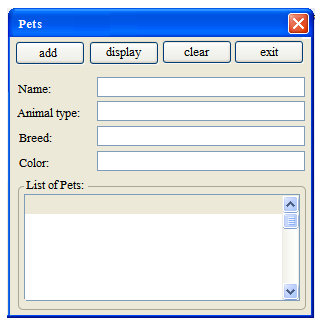
فكرت اعمل بس اول فريم اللي فية الدوال الرئيسية بس وبعدها اتفرع

بكل دالة فريم

انا حطيت تصوري للتصميم عملتة بالفيجول

اتمنى تشوفة

اما عن الدوال ف شغلت دالة

الاضافة "Add"

بس ما طلعت مرتبة زي ما انت عامل ما شاء الله

جزاك الله خير

import  java.awt.*;
import  java.awt.event.*;


public class pet1 extends Frame implements ActionListener
{
 pet1 obj[];
 static int count = 0;

 Button button1, button2, button3, button4;
 Image img1;
 Label wel;
                                    TextField tx1;
  TextField tx2 ;
  TextField tx3 ;
  TextField tx4 ;
                                  Button done;
                Button clear;


private String name;
private String type;
private String breed;
private String colour;

// image  كيف اقدر اعرفها في  array 
 //private double praice;


public void setname (String n)
     {name = n;
     }
public String getname()
     {return name;
     }


public void settype (String t)
     {type = t;
     }
public String gettype()
     {return type;
     }


public void setbreed (String B)
     {breed = b;
     }
public String getbreed()
     {return breed;
     }


public void setcolour (String c)
     {colour = c;
     }
public String getcolour()
     {return colour;
     }
/*
public void setname (String n)
     {name = n;
     }
public String getname()
     {return name;
     }
*/

public pet1(String name, String type, String breed, String color) {

 super("PETS");
 setLayout(new FlowLayout());
 obj = new pet1[50];
 this.name = name;
    this.type = type;
    this.breed = breed;
    this.colour = colour;
} 


 /*public pet1()
 {
  super("PETS");
  obj = new pet1[50];

 }*/
 //////////////////////////////////////////////////////////////////////////////////////////////////


 public void addComponents()
 {
  //addComponent("South", new Button("South"));

  Panel p = new Panel();
  add(p, BorderLayout.CENTER);

  Label wel = new Label("welcome in pets world");
  p.add(wel);

  Panel p2 = new Panel();
  add(p2, BorderLayout.SOUTH);

  button1 = new Button("ADD");
  button2 = new Button("DISPLAY");
  button3 = new Button("Delete");
  button4 = new Button("EXIT");

  p2.add(button1);     //, FlowLayout.SOUTH);
  p2.add(button2);     //, FlowLayout.SOUTH);
  p2.add(button3);     //, FlowLayout.SOUTH);
  p2.add(button4);    //, FlowLayout.SOUTH);

  pack();

  setVisible(true);

  button1.addActionListener(this);
  //button2.addActionListener(this);
  //button3.addActionListener(this);
  //button4.addActionListener(this);

 }

public void init()
{
 //img1 = getImage(getDocumentBase(), "splash.gif");
}

 public void paint(Graphics g)

{
 g.drawImage(img1, 50, 100, this);
}
 //--------------------------------------------------------------------------


 public void Add()
 {  
Frame frame=new Frame("ADD");
//frame.setLayout(new FlowLayout(FlowLayout.LEFT));
frame.setSize(300,300);
frame.setVisible(true);


   tx1 = new TextField(20);
   tx2 = new TextField(20);
   tx3 = new TextField(20);
   tx4 = new TextField(20);


   done = new Button(" Done ");
   clear = new Button(" Clear ");


  frame.setLayout(new GridLayout(5,2));

  frame.add(new Label(" Name  "));
  frame.add(tx1);

  frame.add(new Label(" Type  "));
  frame.add(tx2);

  frame.add(new Label(" Breed  "));
  frame.add(tx3);

  frame.add(new Label(" Colour  "));
  frame.add(tx4);

  frame.add(done);
  frame.add(clear);


done.addActionListener(this);
clear.addActionListener(this);

}
//------------------------------------------------------------------------------------

public void clear()
{                                  tx1.setText("  ");
  tx2.setText( "   ");
  tx3.setText("  ");
  tx4.setText(" ");
  pack();
  show();
}


public void done()
{  
  obj[count].setname ( tx1.getText());
  obj[count].settype (tx2.getText());
  obj[count].setbreed (tx3.getText());
  obj[count].setcolour (tx4.getText());
  count++;
  pack();
  show();
}                     


 /*public void display()
 {

  Frame frame = new Frame("ADD");
  setSize(400, 400);
  setBackground(Color.gray);
  setVisible(true);

  TextField tx1 = new TextField(20);
  TextField tx2 = new TextField(20);
  TextField tx3 = new TextField(20);
  TextField tx4 = new TextField(20);

  //Label Colour = new Label("Colour");
  Button done = new Button(" Done ");
  Button clear = new Button(" Clear ");


  setLayout(new GridLayout(5, 2));

  frame.add(new Label(" Name  "));
  frame.add(tx1);

  add(new Label(" Type  "));
  add(tx2);

  add(new Label(" Breed  "));
  add(tx3);

  add(new Label(" Colour  "));
  add(tx4);

  add(done);
  add(clear);

  //done.addActionListener(this);


  obj[count].setname(tx1.getText());
  obj[count].settype = tx2.getText();
  obj[count].setbreed = tx3.getText();
  obj[count].setcolour = tx4.getText();
  count++;
  pack();
  show();

 } 
         { 

           for(int i=0;i<count; i++)

      {   System.out.println("\t" + obj.getname());
          System.out.println("\t" + obj.gettype());
    System.out.println("\t" + obj.getbreed());
             System.out.println("\t" + obj.getcolour());
          System.out.println("\t" + obj.getimg()); 


        }
}

}
*/


 //--------------------------------------------------------------------------------

 public void actionPerformed(ActionEvent e)
 {
  if (e.getSource() == button4)
  {
   setVisible(false);
   System.exit(0);
  }
  else
   if (e.getSource() == button1)
    Add();
                                                         else
                                                         if (e.getSource() ==  clear )
                                                                        clear();
                                                        //  else
                                                      //  if (e.getSource() ==  done)
                                                                       // done();


   //else                                                                                
    //if (e.getSource() == button2)
   //  display();
 }


 public static void main(String[] arg)
 {

  pet1 p = new pet1("name","type","breed","colour");
  p.addComponents();


 }

}
#10

لماذا لم تقومي بما قاله الأخ delab

من الأفضل ان تفصلي المعلومات الخاصة بالحيوان في كلاس منفصل وحتى الصورة يمكن وضع مصفوفة صور مثل أي مصفوفة من أي نوع

Image img[];

وعندما لا تفصلي المعلومات فلاحظي بأنك تبني واجهة لكل حيوان ويعتبر استهلاك في الذاكرة لا داعلي لها بالإضافة إلى اني اعتقد بأن فصلها سيحسن بأداء برنامجك

ready to do full students projects

digitalscenter@hotmail.com

+966530357742

#11

انا اعدت التصميم زي ما عملة

delab

بس لسة في اخطاء وكمان مش عارفة كيف اعمل مصفوفة لعرض الصور لدالة

display

اذا ممكن تساعدوني

ما عاد عندي وقت التسليم الاربعاء ولسة باقي الدكيومنتيشن

documentation

بلـــــــــــــــــــــــــــــــــــــــيز

import java.awt.*;

import java.awt.event.*;


public class pets extends Frame implements ActionListener

{

pets obj[];

static int count = 0;

static int found = 0;

static int i = 0;

Image img1;

Label wel;

Button button1 = new Button("ADD");

Button button2 = new Button("DISPLAY");

Button button3 = new Button("EDIT");

Button button4 = new Button("EXIT");

Button done = new Button(" Done ");

Button clear = new Button(" Clear ");

Button enter = new Button(" Enter ");

Button next = new Button(" Next ");

TextArea aTextArea = new TextArea();

//Label notfound; 

//Label wel = new Label("welcome in pets world");

TextField tx1 = new TextField(20);

TextField tx2 = new TextField(20);

TextField tx3 = new TextField(20);

TextField tx4 = new TextField(20);


private String name;

private String type;

private String breed;

private String colour;


// image كيف اقدر اعرفها في array 

//private double praice;


public void setname(String n)

{

name = n;

}

public String getname()

{

return name;

}


public void settype(String t)

{

type = t;

}

public String gettype()

{

return type;

}


public void setbreed(String B)

{

breed = b;

}

public String getbreed()

{

return breed;

}


public void setcolour(String c)

{

colour = c;

}

public String getcolour()

{

return colour;

}


public pets(String name, String type, String breed, String color)

{

super("PETS");

setLayout(new BorderLayout());

Panel p = new Panel(new GridLayout(6, 2));

obj = new pets[50];

this.name = name;

this.type = type;

this.breed = breed;

this.colour = colour;

//------------------------

p.add(new Label(" Name "));

p.add(tx1);

p.add(new Label(" Type "));

p.add(tx2);

p.add(new Label(" Breed "));

p.add(tx3);

p.add(new Label(" Colour "));

p.add(tx4);

//-------------------

add(button1, BorderLayout.NORTH);

add(button2, BorderLayout.NORTH);

add(button3, BorderLayout.NORTH);

add(button4, BorderLayout.NORTH);

add(done, BorderLayout.NORTH);

add(clear, BorderLayout.NORTH);

add(enter, BorderLayout.NORTH);

add(next, BorderLayout.NORTH);

add(p, BorderLayout.CENTER);

add(aTextArea, BorderLayout.SOUTH);


button1.addActionListener(this);

button2.addActionListener(this);

button3.addActionListener(this);

button4.addActionListener(this);

done.addActionListener(this);

clear.addActionListener(this);

enter.addActionListener(this);

next.addActionListener(this);

pack();

show();

}

//--------------------------------------------------------------------------------

public void actionPerformed(ActionEvent e)

{

if (e.getSource() == button4)

{

setVisible(false);

System.exit(0);

}

else

if (e.getSource() == button1)

{ aTextArea.append(tx1.getText(), tx2.getText(), tx3.getText(), tx4.getText());

}

else

if (e.getSource() == clear)

clear();

else

if (e.getSource() == done)

done();


else

if (e.getSource() == button2)

// display();

{

obj[count].setname(tx1.getText());

obj[count].settype = tx2.getText();

obj[count].setbreed = tx3.getText();

obj[count].setcolour = tx4.getText();

count++;

}

else

if (e.getSource() == next)

next();


else

if (e.getSource() == button3)

// Edit();

//else

if (e.getSource() == enter)

enter();

}


public void init()

{

//img1 = getImage(getDocumentBase(), "splash.gif");

}

public void paint(Graphics g)

{

g.drawImage(img1, 50, 100, this);


}


//--------------------------------------------------------------------------


public void clear()

{

tx1.setText(" ");

tx2.setText(" ");

tx3.setText(" ");

tx4.setText(" ");

pack();

show();

}


public void done()

{

obj[count] = new pets(tx1.getText(), tx2.getText(), tx3.getText(), tx4.getText());

count++;

pack();

show();

}

//----------------

public void enter()

{

for (int i = 0; i < count; i++)

if ((tx1.getText()) == obj.getname())

{

add(new Label(" Name "));

add(tx1);

add(new Label(" Type "));

add(tx2);

add(new Label(" Breed "));

add(tx3);

add(new Label(" Colour "));

add(tx4);

found = 1;

}


if (found == 0)

add(new TextArea(" Sorry! Not Found "));

TextArea aTextArea;

}

//--------------------

public void next()

{

++i;

if (i < count)

{

tx1.setText(obj.getname());

tx2.setText(obj.gettype());

tx3.setText(obj.getbreed());

tx4.setText(obj.getcolour());

}

pack();

show();

}

}

//-----------------

public class pet12

{

public static void main(String[] arg)

{

new pets("name", "type", "breed", "colour");


}

تم تعديل هذه المشاركة بواسطة نرجسية في 22 يونيو 2008 في 17:28

#12
package Nerjesiah;
import java.awt.*;

import java.awt.event.*;


public class Narjesiah

{

public static void main(String[] arg)

{

new pet12("name", "type", "breed", "colour");


}

}

class pet12 extends Frame implements ActionListener

{

pet12 obj[];

static int count = 0;

static int found = 0;

static int i = 0;

Image img1;

Label wel;

Button button1 = new Button("ADD");

Button button2 = new Button("DISPLAY");

Button button3 = new Button("EDIT");

Button button4 = new Button("EXIT");

Button done = new Button(" Done ");

Button clear = new Button(" Clear ");

Button enter = new Button(" Enter ");

Button next = new Button(" Next ");

TextArea aTextArea = new TextArea();

//Label notfound;

//Label wel = new Label("welcome in pets world");

TextField tx1 = new TextField(20);

TextField tx2 = new TextField(20);

TextField tx3 = new TextField(20);

TextField tx4 = new TextField(20);


private String name;

private String type;

private String breed;

private String colour;


// image كيف اقدر اعرفها في array

//private double praice;


public void setname(String n)

{

name = n;

}

public String getname()

{

return name;

}


public void settype(String t)

{

type = t;

}

public String gettype()

{

return type;

}


public void setbreed(String b)

{

breed = b;

}

public String getbreed()

{

return breed;

}


public void setcolour(String c)

{

colour = c;

}

public String getcolour()

{

return colour;

}


public pet12(String name, String type, String breed, String color)

{

super("PETS");

setLayout(new BorderLayout());

Panel p = new Panel(new GridLayout(6, 2));

obj = new pet12[50];

this.name = name;

this.type = type;

this.breed = breed;

this.colour = colour;

//------------------------

p.add(new Label(" Name "));

p.add(tx1);

p.add(new Label(" Type "));

p.add(tx2);

p.add(new Label(" Breed "));

p.add(tx3);

p.add(new Label(" Colour "));

p.add(tx4);

//-------------------

add(button1, BorderLayout.NORTH);

add(button2, BorderLayout.NORTH);

add(button3, BorderLayout.NORTH);

add(button4, BorderLayout.NORTH);

add(done, BorderLayout.NORTH);

add(clear, BorderLayout.NORTH);

add(enter, BorderLayout.NORTH);

add(next, BorderLayout.NORTH);

add(p, BorderLayout.CENTER);

add(aTextArea, BorderLayout.SOUTH);


button1.addActionListener(this);

button2.addActionListener(this);

button3.addActionListener(this);

button4.addActionListener(this);

done.addActionListener(this);

clear.addActionListener(this);

enter.addActionListener(this);

next.addActionListener(this);

pack();

show();

}

//--------------------------------------------------------------------------------

public void actionPerformed(ActionEvent e)

{

if (e.getSource() == button4)

{

setVisible(false);

System.exit(0);

}

else

if (e.getSource() == button1)

{ 
	//aTextArea.append(tx1.getText(), tx2.getText(), tx3.getText(), tx4.getText());
	aTextArea.append(tx1.getText());
	aTextArea.append(tx2.getText());
	aTextArea.append(tx3.getText());
	aTextArea.append(tx4.getText());
}

else

if (e.getSource() == clear)

clear();

else

if (e.getSource() == done)

done();


else

if (e.getSource() == button2)

// display();

{

obj[count].setname(tx1.getText());

obj[count].settype ( tx2.getText() );

obj[count].setbreed( tx3.getText());

obj[count].setcolour( tx4.getText());

count++;

}

else

if (e.getSource() == next)

next();


else

if (e.getSource() == button3)

// Edit();

//else

if (e.getSource() == enter)

enter();

}


public void init()

{

//img1 = getImage(getDocumentBase(), "splash.gif");

}

public void paint(Graphics g)

{

g.drawImage(img1, 50, 100, this);


}


//--------------------------------------------------------------------------


public void clear()

{

tx1.setText(" ");

tx2.setText(" ");

tx3.setText(" ");

tx4.setText(" ");

pack();

show();

}


public void done()

{

obj[count] = new pet12(tx1.getText(), tx2.getText(), tx3.getText(), tx4.getText());

count++;

pack();

show();

}

//----------------

public void enter()

{

for (int i = 0; i < count; i++)

if ((tx1.getText()) == obj.getname())

{

add(new Label(" Name "));

add(tx1);

add(new Label(" Type "));

add(tx2);

add(new Label(" Breed "));

add(tx3);

add(new Label(" Colour "));

add(tx4);

found = 1;

}


if (found == 0)

add(new TextArea(" Sorry! Not Found "));

TextArea aTextArea;

}

//--------------------

public void next()

{

++i;

if (i < count)

{

tx1.setText(obj.getname());

tx2.setText(obj.gettype());

tx3.setText(obj.getbreed());

tx4.setText(obj.getcolour());

}

pack();

show();

}

}

//-----------------

قمت بتعديل الأخطاء الموجودة في الشيفرة

الآن تعمل معك

يا ريت توضحي ما التعديلات التي تريديها الضبط

لم أقوم بإضافة أي شيء

حتى أتأكد أن لا مشاكل في الكود

تحياتي

حزمة المحرك الإصدارة 0.8

أي أحد يجد أني ظلمته فليراسلني

وبإذن الله لو كان له حق سيأخذه

728x90.png

#13

الاخ

alaadiaa

لك جزيل الشكر والعرفان ما قصرت حليتها

بس انا شلت البكج

وعليها كم تعديل حق شغلي اليوم

انا حاولت اقلل من استخدام ال

button

الزايد

يعني

ودي اخلي الادخال و المسح يخص الدالتين display &Add

بس اللي صار عندي لمن يضيف يضيف كل مرة في فريم جديد ولمن اعمل

clear

للadd

يعمل لي مسح لعناصر ال

array

حاولت اعدل بس مش ظابط

الاخ

Leavetrace

لك جزيل الشكر على ذوقك

بس البرنامج اللي بالمرفق

مش راضي يفتح والعلة انة ناقصة

main

هل ممكن اشوف الكود

import  java.awt.*;
import  java.awt.event.*;


class pets extends Frame implements ActionListener, WindowListener
{
 pets obj[];
 static int count = 0;
 static int found = 0;
 static int i = 0;

 Image img1;
 Label wel;

 Button button1 = new Button("ADD");
 Button button2 = new Button("DISPLAY");
 Button button3 = new Button("EDIT");
 Button button4 = new Button("EXIT");
 //Button done = new Button(" Done ");
 Button clear = new Button(" Clear ");
 Button enter = new Button(" Enter ");
 Button next = new Button(" Next ");

 TextArea aTextArea = new TextArea();
 //Label notfound; 
 //Label wel = new Label("welcome in pets world");
 TextField tx1 = new TextField(15);
 TextField tx2 = new TextField(15);
 TextField tx3 = new TextField(15);
 TextField tx4 = new TextField(15);


 private String name;
 private String type;
 private String breed;
 private String colour;


 // image  كيف اقدر اعرفها في  array 
 //private double praice;


 public void setname(String n)
 {
  name = n;
 }
 public String getname()
 {
  return name;
 }


 public void settype(String t)
 {
  type = t;
 }
 public String gettype()
 {
  return type;
 }


 public void setbreed(String B)
 {
  breed = b;
 }
 public String getbreed()
 {
  return breed;
 }


 public void setcolour(String c)
 {
  colour = c;
 }
 public String getcolour()
 {
  return colour;
 }


 public pets(String name, String type, String breed, String color)
 {

super.addWindowListener(new WindowAdapter(){

       public void windowClosing(WindowEvent w)
       {
         System.exit(0);
       }
    });
     setSize(300,300);
      setVisible(true);


  setLayout(new BorderLayout());


  Panel p = new Panel(new GridLayout(6, 1));
  obj = new pets[50];
  this.name = name;
  this.type = type;
  this.breed = breed;
  this.colour = colour;
  //------------------------

  p.add(button1);
  p.add(button2);
  p.add(button3);
  p.add(button4);
//  p.add(done);
  p.add(clear);
  p.add(enter);
  p.add(next);
  p.add(new Label(" Name  "));
  p.add(tx1);

  p.add(new Label(" Type  "));
  p.add(tx2);

  p.add(new Label(" Breed  "));
  p.add(tx3);

  p.add(new Label(" Colour  "));
  p.add(tx4);

  //-------------------
  add(aTextArea,BorderLayout.CENTER);
  add(p ,BorderLayout.SOUTH);


  //addWindowListener(this);//موقعها صحيح  


  button1.addActionListener(this);
  button2.addActionListener(this);
  button3.addActionListener(this);
  button4.addActionListener(this);
  //done.addActionListener(this);
  clear.addActionListener(this);
  enter.addActionListener(this);
  next.addActionListener(this);

  aTextArea.setFont(new Font("TimesRoman",Font.ITALIC,12));

  button1.setFont(new Font("TimesNewRoman",Font.ITALIC,12));
  button2.setFont(new Font("TimesNewRoman",Font.ITALIC,12));
  button3.setFont(new Font("TimesNewRoman",Font.ITALIC,12));
  button4.setFont(new Font("TimesNewRoman",Font.ITALIC,12));
  //done.setFont(new Font("TimesNewRoman",Font.ITALIC,12));
  clear.setFont(new Font("TimesNewRoman",Font.ITALIC,12));
  enter.setFont(new Font("TimesNewRoman",Font.ITALIC,12));
  next.setFont(new Font("TimesNewRoman", Font.ITALIC, 12));


  pack();
  show();
 }


  public void windowOpened(WindowEvent w){}
 public void windowClosed(WindowEvent w){}
public void windowClosing(WindowEvent w){}
 public void windowIconified(WindowEvent w){}
 public void windowDeiconified(WindowEvent w){}
 public void windowActivated(WindowEvent w){}
 public void windowDeactivated(WindowEvent w){}
 //--------------------------------------------------------------------------------

 public void actionPerformed(ActionEvent e)
 {   int x;
  if (e.getSource() == button4) //   Exit
  {
   setVisible(false);
   System.exit(0);
  }
  else
   if (e.getSource() == button1) //    Add();

                                                             { aTextArea.append("Name is :");
                                              aTextArea.append(tx1.getText());
             aTextArea.append("               ");

                                                              aTextArea.append("Breed is :");
           aTextArea.append(tx2.getText());
           aTextArea.append("               ");

                                                               aTextArea.append("Type is :");
                             aTextArea.append(tx3.getText());
             aTextArea.append("                 ");

                                                               aTextArea.append("Colour is :");
           aTextArea.append(tx4.getText());
             aTextArea.append("                 ");

                                                              obj[count] = new pets(tx1.getText(), tx2.getText(), tx3.getText(), tx4.getText());
                                                   count++;

   }


                                                  /*    aTextArea.append("Type is :");
                                                       aTextArea.append(tx1.getText());
   aTextArea.append(tx2.getText());
   aTextArea.append(  tx3.getText()); 
   aTextArea.append(tx4.getText());
                                                     obj[count] = new pets(tx1.getText(), tx2.getText(), tx3.getText(), tx4.getText());
                             count++;
   }*/
   else

    if (e.getSource() == clear)
     clear();
    else
     /*if (e.getSource() == done)
      done();


     else*/
      if (e.getSource() == button2)  // display();
      {        
                                                                                                                             for( x=0;x<obj[count];x++)

                                                                                                                            { aTextArea.append("Name is :");
       aTextArea.append(obj[x].getname());
        aTextArea.append("               ");

                                                                                                                             aTextArea.append("Breed is :");
       aTextArea.append(obj[x].getname());
        aTextArea.append("               ");

                                                                                                                               aTextArea.append("Type is :");
       aTextArea.append(obj[x].getname());
        aTextArea.append("                 ");

                                                                                                                              aTextArea.append("Colour is :");
       aTextArea.append(obj[x].getname());
        aTextArea.append("                 ");


       }
      }
      else
       if (e.getSource() == next)
        next();


       else
        if (e.getSource() == button3)  // Edit();
        { }

        else
         if (e.getSource() == enter)
          enter();

 }


 public void init()
 {
  //img1 = getImage(getDocumentBase(), "splash.gif");
 }

 public void paint(Graphics g)
 {
  g.drawImage(img1, 50, 100, this);


 }


 //--------------------------------------------------------------------------


  public void clear()
  {
  tx1.setText("  ");
   tx2.setText("   ");
   tx3.setText("  ");
                                      tx4.setText("  ");
                                  aTextArea.setText("  ");

  pack();
  show();
 }


 /*public void done()
 {

  pack();
  show();
 }*/
 //----------------
 public void enter()
 {}
/*
  for (int i = 0; i < count; i++)

   if ((tx1.getText()) == obj.getname())
   {
    add(new Label(" Name  "));
    add(tx1);

    add(new Label(" Type  "));
    add(tx2);

    add(new Label(" Breed  "));
    add(tx3);

    add(new Label(" Colour  "));
    add(tx4);

    found = 1;
   }


  if (found == 0)
   add(new TextArea(" Sorry! Not Found  "));
  TextArea aTextArea;
 }*/
 //--------------------
 public void next()
 {
  ++i;
  if (i < count)
  {
   tx1.setText(obj.getname());
   tx2.setText(obj.gettype());
   tx3.setText(obj.getbreed());
   tx4.setText(obj.getcolour());
  }
  pack();
  show();
 }
}
 //-----------------

public class pet12
{
 public static void main(String[] arg)
 {

   new pets("name", "type", "breed", "colour");


 }


}
#14

قمت بإضافة فئة جديدة اسمها Pet

منفصلة عن الفئة الرئيسية

وهذه هيه الشيفرة بعد التعديل

انظري إليها وأي مساعدة أنا جاهز

الفئة القديمة بعد التعديل

package Nerjesiah;


import java.awt.*;
import java.awt.event.*;


class pets extends Frame implements ActionListener, WindowListener
{
Pet[] obj;
static int count = 0;
static int found = 0;
static int i = 0;

Image img1;
Label wel;

Button button1 = new Button("ADD");
Button button2 = new Button("DISPLAY");
Button button3 = new Button("EDIT");
Button button4 = new Button("EXIT");
//Button done = new Button(" Done ");
Button clear = new Button(" Clear ");
Button enter = new Button(" Enter ");
Button next = new Button(" Next ");

TextArea aTextArea = new TextArea();
//Label notfound;
//Label wel = new Label("welcome in pets world");
TextField tx1 = new TextField(15);
TextField tx2 = new TextField(15);
TextField tx3 = new TextField(15);
TextField tx4 = new TextField(15);


public pets(String name, String type, String breed, String color)
{

super.addWindowListener(new WindowAdapter(){

public void windowClosing(WindowEvent w)
{
System.exit(0);
}
});
setSize(300,300);
setVisible(true);


setLayout(new BorderLayout());


Panel p = new Panel(new GridLayout(6, 1));
obj = new Pet[50];

//------------------------

p.add(button1);
p.add(button2);
p.add(button3);
p.add(button4);
// p.add(done);
p.add(clear);
p.add(enter);
p.add(next);
p.add(new Label(" Name "));
p.add(tx1);

p.add(new Label(" Type "));
p.add(tx2);

p.add(new Label(" Breed "));
p.add(tx3);

p.add(new Label(" Colour "));
p.add(tx4);

//-------------------
add(aTextArea,BorderLayout.CENTER);
add(p ,BorderLayout.SOUTH);


//addWindowListener(this);//موقعها صحيح


button1.addActionListener(this);
button2.addActionListener(this);
button3.addActionListener(this);
button4.addActionListener(this);
//done.addActionListener(this);
clear.addActionListener(this);
enter.addActionListener(this);
next.addActionListener(this);

aTextArea.setFont(new Font("TimesRoman",Font.ITALIC,12));

button1.setFont(new Font("TimesNewRoman",Font.ITALIC,12));
button2.setFont(new Font("TimesNewRoman",Font.ITALIC,12));
button3.setFont(new Font("TimesNewRoman",Font.ITALIC,12));
button4.setFont(new Font("TimesNewRoman",Font.ITALIC,12));
//done.setFont(new Font("TimesNewRoman",Font.ITALIC,12));
clear.setFont(new Font("TimesNewRoman",Font.ITALIC,12));
enter.setFont(new Font("TimesNewRoman",Font.ITALIC,12));
next.setFont(new Font("TimesNewRoman", Font.ITALIC, 12));


pack();
show();
}


public void windowOpened(WindowEvent w){}
public void windowClosed(WindowEvent w){}
public void windowClosing(WindowEvent w){}
public void windowIconified(WindowEvent w){}
public void windowDeiconified(WindowEvent w){}
public void windowActivated(WindowEvent w){}
public void windowDeactivated(WindowEvent w){}
//--------------------------------------------------------------------------------

public void actionPerformed(ActionEvent e)
{ int x;
if (e.getSource() == button4) // Exit
{
setVisible(false);
System.exit(0);
}
else
if (e.getSource() == button1) // Add();

{ aTextArea.append("Name is :");
aTextArea.append(tx1.getText());
aTextArea.append(" ");

aTextArea.append("Breed is :");
aTextArea.append(tx2.getText());
aTextArea.append(" ");

aTextArea.append("Type is :");
aTextArea.append(tx3.getText());
aTextArea.append(" ");

aTextArea.append("Colour is :");
aTextArea.append(tx4.getText());
aTextArea.append(" ");

obj[count] = new Pet(tx1.getText(), tx2.getText(), tx3.getText(), tx4.getText());
count++;

}


/* aTextArea.append("Type is :");
aTextArea.append(tx1.getText());
aTextArea.append(tx2.getText());
aTextArea.append( tx3.getText());
aTextArea.append(tx4.getText());
obj[count] = new pets(tx1.getText(), tx2.getText(), tx3.getText(), tx4.getText());
count++;
}*/
else

if (e.getSource() == clear)
clear();
else
/*if (e.getSource() == done)
done();


else*/
if (e.getSource() == button2) // display();
{
for( x=0;x<count;x++)

{ aTextArea.append("Name is :");
aTextArea.append(obj[x].getname());
aTextArea.append(" ");

aTextArea.append("Breed is :");
aTextArea.append(obj[x].getname());
aTextArea.append(" ");

aTextArea.append("Type is :");
aTextArea.append(obj[x].getname());
aTextArea.append(" ");

aTextArea.append("Colour is :");
aTextArea.append(obj[x].getname());
aTextArea.append(" ");


}
}
else
if (e.getSource() == next)
next();


else
if (e.getSource() == button3) // Edit();
{ }

else
if (e.getSource() == enter)
enter();

}


public void init()
{
//img1 = getImage(getDocumentBase(), "splash.gif");
}

public void paint(Graphics g)
{
g.drawImage(img1, 50, 100, this);


}


//--------------------------------------------------------------------------


public void clear()
{
tx1.setText(" ");
tx2.setText(" ");
tx3.setText(" ");
tx4.setText(" ");
aTextArea.setText(" ");

pack();
show();
}


/*public void done()
{

pack();
show();
}*/
//----------------
public void enter()
{}
/*
for (int i = 0; i < count; i++)

if ((tx1.getText()) == obj.getname())
{
add(new Label(" Name "));
add(tx1);

add(new Label(" Type "));
add(tx2);

add(new Label(" Breed "));
add(tx3);

add(new Label(" Colour "));
add(tx4);

found = 1;
}


if (found == 0)
add(new TextArea(" Sorry! Not Found "));
TextArea aTextArea;
}*/
//--------------------
public void next()
{
++i;
if (i < count)
{
tx1.setText(obj.getname());
tx2.setText(obj.gettype());
tx3.setText(obj.getbreed());
tx4.setText(obj.getcolour());
}
pack();
show();
}
}
//-----------------

public class Narjesiah
{
public static void main(String[] arg)
{

new pets("name", "type", "breed", "colour");


}


}

الفئة التي أضفتها أنا

package Nerjesiah;

public class Pet {
	private String name;
	private String type;
	private String breed;
	private String colour;


	// image كيف اقدر اعرفها في array
	//private double praice;


	public Pet(String name, String type, String breed, String colour) {
		this.name = name;
		this.type = type;
		this.breed = breed;
		this.colour = colour;
	}
	public void setname(String n)
	{
	name = n;
	}
	public String getname()
	{
	return name;
	}


	public void settype(String t)
	{
	type = t;
	}
	public String gettype()
	{
	return type;
	}


	public void setbreed(String b)
	{
	breed = b;
	}
	public String getbreed()
	{
	return breed;
	}


	public void setcolour(String c)
	{
	colour = c;
	}
	public String getcolour()
	{
	return colour;
	}
}

بالمناسبة لماذا غيرتي اسمك؟؟

يبدو لي أن الأسماء أصبحت كالموضة

أي شخص يغير اسمه في أي وقت

أريد أن أغير اسمي

لكني كسول

تحياتي

حزمة المحرك الإصدارة 0.8

أي أحد يجد أني ظلمته فليراسلني

وبإذن الله لو كان له حق سيأخذه

728x90.png

#15

مين غير اسمي ؟؟؟؟؟؟؟؟؟؟؟؟؟؟؟؟؟؟؟؟؟؟؟؟؟؟؟؟؟

وكيف اقدر اغيرة

على العموم

مشكورين جداااااااااااااااااااا

انا اخذت استثناء لحد السبت

اذا ممكن تشوفون لي صرفة في الاكواد اللي ما تشتغل صح

رجاء

نرجسية

#16

ايش الي ما يشتغل صح

ووين محاولاتك فيه

لا تركني أختي

ونحن بإذن الله سنساعدك

لكنا نريد أن تستفيدي

تحياتي

حزمة المحرك الإصدارة 0.8

أي أحد يجد أني ظلمته فليراسلني

وبإذن الله لو كان له حق سيأخذه

728x90.png

#17

السلام عليكم

هذي اخر محاولاتي

import java.awt.*;

import java.awt.event.*;


class pets extends Frame implements ActionListener, WindowListener

{

pets obj[];

static int count = 0;

static int found = 0;

static int i = 0;

Image img1;

//Label wel;

Button button1 = new Button("ADD");

Button button2 = new Button("DISPLAY");

Button button3 = new Button("EDIT");

Button button4 = new Button("EXIT");

//Button done = new Button(" Done ");

Button clear = new Button(" Clear ");

Button enter = new Button(" Enter ");

Button next = new Button(" Next ");

TextArea aTextArea = new TextArea();

//Label notfound; 

Label wel = new Label(" welcome in pets world ");

TextField tx1 = new TextField(15);

TextField tx2 = new TextField(15);

TextField tx3 = new TextField(15);

TextField tx4 = new TextField(15);


private String name;

private String type;

private String breed;

private String colour;


// image كيف اقدر اعرفها في array 

//private double praice;


public void setname(String n)

{

name = n;

}

public String getname()

{

return name;

}


public void settype(String t)

{

type = t;

}

public String gettype()

{

return type;

}


public void setbreed(String B)

{

breed = b;

}

public String getbreed()

{

return breed;

}


public void setcolour(String c)

{

colour = c;

}

public String getcolour()

{

return colour;

}


public pets(String name, String type, String breed, String color)

{


super.addWindowListener(new WindowAdapter(){

public void windowClosing(WindowEvent w)

{

System.exit(0);

}

});

setSize(300,300);

setVisible(true);


setLayout(new BorderLayout());


Panel p = new Panel(new GridLayout(4, 1));

Panel p1 = new Panel(new GridLayout(4, 2));

Panel p2 = new Panel();

obj = new pets[50];

this.name = name;

this.type = type;

this.breed = breed;

this.colour = colour;

//------------------------


p1.add(button1);

p1.add(button2);

p1.add(button3);

p1.add(button4);

// p1.add(done);

p1.add(clear);

p1.add(enter);

p1.add(next);


p.add(new Label(" Name "));

p.add(tx1);

p.add(new Label(" Type "));

p.add(tx2);

p.add(new Label(" Breed "));

p.add(tx3);

p.add(new Label(" Colour "));

p.add(tx4);

p2.setBackground(Color.green);

p2.add(wel);

p2.add(aTextArea);


//-------------------

//add(aTextArea,BorderLayout.CENTER);

add(p2, BorderLayout.NORTH);

add(p, BorderLayout.CENTER);

add(p1, BorderLayout.SOUTH);


//-------------------

button1.addActionListener(this);

button2.addActionListener(this);

button3.addActionListener(this);

button4.addActionListener(this);

//done.addActionListener(this);

clear.addActionListener(this);

enter.addActionListener(this);

next.addActionListener(this);

wel.setFont(new Font("TimesRoman", Font.ITALIC, 24));

aTextArea.setFont(new Font("TimesRoman",Font.ITALIC,16));

button1.setFont(new Font("TimesNewRoman",Font.ITALIC,12));

button2.setFont(new Font("TimesNewRoman",Font.ITALIC,12));

button3.setFont(new Font("TimesNewRoman",Font.ITALIC,12));

button4.setFont(new Font("TimesNewRoman",Font.ITALIC,12));

//done.setFont(new Font("TimesNewRoman",Font.ITALIC,12));

clear.setFont(new Font("TimesNewRoman",Font.ITALIC,12));

enter.setFont(new Font("TimesNewRoman",Font.ITALIC,12));

next.setFont(new Font("TimesNewRoman", Font.ITALIC, 12));


pack();

show();

}


public void windowOpened(WindowEvent w){}

public void windowClosed(WindowEvent w){}

public void windowClosing(WindowEvent w){}

public void windowIconified(WindowEvent w){}

public void windowDeiconified(WindowEvent w){}

public void windowActivated(WindowEvent w){}

public void windowDeactivated(WindowEvent w){}

//--------------------------------------------------------------------------------

public void actionPerformed(ActionEvent e)

{ int x;

if (e.getSource() == button4) // Exit

{

setVisible(false);

System.exit(0);

}

else

if (e.getSource() == button1) // Add


{ aTextArea.append("Name is :");

aTextArea.append(tx1.getText());

aTextArea.append(" ");

aTextArea.append("Breed is :");

aTextArea.append(tx2.getText());

aTextArea.append(" ");

aTextArea.append("Type is :");

aTextArea.append(tx3.getText());

aTextArea.append(" ");

aTextArea.append("Colour is :");

aTextArea.append(tx4.getText());

aTextArea.append(" ");

obj[count] = new pets(tx1.getText(), tx2.getText(), tx3.getText(), tx4.getText());

count++;


}


/* aTextArea.append("Type is :");

aTextArea.append(tx1.getText());

aTextArea.append(tx2.getText());

aTextArea.append( tx3.getText()); 

aTextArea.append(tx4.getText());

obj[count] = new pets(tx1.getText(), tx2.getText(), tx3.getText(), tx4.getText());

count++;

}*/

else


if (e.getSource() == clear)

clear();

else

/*if (e.getSource() == done)

done();


else*/

if (e.getSource() == button2) // display();

{ 

for( x=0;x<count;x++)


{ /* aTextArea.setText(objx].getname());

aTextArea.setText(obj[x].getbreed());

aTextArea.setText(obj[x].gettype());

aTextArea.setText(obj[x].getcolour());*/

aTextArea.append("Name is :");

aTextArea.append(obj[x].getname());

aTextArea.append(" ");


aTextArea.append("Breed is :");

aTextArea.append(obj[x].getbreed());

aTextArea.append(" ");

aTextArea.append("Type is :");

aTextArea.append(obj[x].gettype());

aTextArea.append(" ");

aTextArea.append("Colour is :");

aTextArea.append(obj[x].getcolour());

aTextArea.append(" ");


}

}

else

if (e.getSource() == next)

next();


else

if (e.getSource() == button3) // Edit();

{ }

else

if (e.getSource() == enter)

enter();

}


public void init()

{

//img1 = getImage(getDocumentBase(), "splash.gif");

}

public void paint(Graphics g)

{

g.drawImage(img1, 50, 100, this);


}


//--------------------------------------------------------------------------


public void clear()

{

tx1.setText(" ");

tx2.setText(" ");

tx3.setText(" ");

tx4.setText(" ");

aTextArea.setText(" ");

pack();

show();

}


/*public void done()

{


pack();

show();

}*/

//----------------

public void enter()

{}

/*

for (int i = 0; i < count; i++)

if ((tx1.getText()) == obj.getname())

{

add(new Label(" Name "));

add(tx1);

add(new Label(" Type "));

add(tx2);

add(new Label(" Breed "));

add(tx3);

add(new Label(" Colour "));

add(tx4);

found = 1;

}


if (found == 0)

add(new TextArea(" Sorry! Not Found "));

TextArea aTextArea;

}*/

//--------------------

public void next()

{

++i;

if (i < count)

{

tx1.setText(obj.getname());

tx2.setText(obj.gettype());

tx3.setText(obj.getbreed());

tx4.setText(obj.getcolour());

}

pack();

show();

}

}

//-----------------

public class pet12

{

public static void main(String[] arg)

{

new pets("name", "type", "breed", "colour");


}


}

ياريت تشيكون عليها

المشكلة عندي لمن اعمل اضافة لاكثر من مرة يفتح لكل مرة فريم وطبيعي هذا ضعف

الشغلة الثانية لمن اعمل display

يروح يعملي عرض على الشاشة من غير ما ينظف الشاشة واذا انا عملت تنضيف يروح يمسح المضاف من

array

فتظل خالية

ولمن اكرر الضغط على البتن يروح يغير شكل التصميم

عدة مشاكل مش لاقية لها حل

والله العظيم عندي امتحانات وانا متاخرة كثير ولا عندي مجال اكثر

اكلم الطيب فيكم ساعدوني الله يسعدكم دنيا واخرة

#18

قمت بحل المشكلتين الأوليين

بالنسبة لمشكلة أنك لما تضغطي على زر يتغير شكل الواجهة

لم تحصل عندي

لذلك لا أستطيع المساعدة

على العموم كنت قد أشرت إلى الحل في ردي السابق

لكني أعيد وأطرح الشيفرة مرة أخرى

package Nerjesiah;


import java.awt.*;
import java.awt.event.*;


class pets extends Frame implements ActionListener, WindowListener
{
Pet[] obj;
static int count = 0;
static int found = 0;
static int i = 0;

Image img1;
Label wel;

Button button1 = new Button("ADD");
Button button2 = new Button("DISPLAY");
Button button3 = new Button("EDIT");
Button button4 = new Button("EXIT");
//Button done = new Button(" Done ");
Button clear = new Button(" Clear ");
Button enter = new Button(" Enter ");
Button next = new Button(" Next ");

TextArea aTextArea = new TextArea();
//Label notfound;
//Label wel = new Label("welcome in pets world");
TextField tx1 = new TextField(15);
TextField tx2 = new TextField(15);
TextField tx3 = new TextField(15);
TextField tx4 = new TextField(15);


public pets(String name, String type, String breed, String color)
{

super.addWindowListener(new WindowAdapter(){

public void windowClosing(WindowEvent w)
{
System.exit(0);
}
});
setSize(300,300);
setVisible(true);


setLayout(new BorderLayout());


Panel p = new Panel(new GridLayout(6, 1));
obj = new Pet[50];

//------------------------

p.add(button1);
p.add(button2);
p.add(button3);
p.add(button4);
// p.add(done);
p.add(clear);
p.add(enter);
p.add(next);
p.add(new Label(" Name "));
p.add(tx1);

p.add(new Label(" Type "));
p.add(tx2);

p.add(new Label(" Breed "));
p.add(tx3);

p.add(new Label(" Colour "));
p.add(tx4);

//-------------------
add(aTextArea,BorderLayout.CENTER);
add(p ,BorderLayout.SOUTH);


//addWindowListener(this);//موقعها صحيح


button1.addActionListener(this);
button2.addActionListener(this);
button3.addActionListener(this);
button4.addActionListener(this);
//done.addActionListener(this);
clear.addActionListener(this);
enter.addActionListener(this);
next.addActionListener(this);

aTextArea.setFont(new Font("TimesRoman",Font.ITALIC,12));

button1.setFont(new Font("TimesNewRoman",Font.ITALIC,12));
button2.setFont(new Font("TimesNewRoman",Font.ITALIC,12));
button3.setFont(new Font("TimesNewRoman",Font.ITALIC,12));
button4.setFont(new Font("TimesNewRoman",Font.ITALIC,12));
//done.setFont(new Font("TimesNewRoman",Font.ITALIC,12));
clear.setFont(new Font("TimesNewRoman",Font.ITALIC,12));
enter.setFont(new Font("TimesNewRoman",Font.ITALIC,12));
next.setFont(new Font("TimesNewRoman", Font.ITALIC, 12));


pack();
show();
}


public void windowOpened(WindowEvent w){}
public void windowClosed(WindowEvent w){}
public void windowClosing(WindowEvent w){}
public void windowIconified(WindowEvent w){}
public void windowDeiconified(WindowEvent w){}
public void windowActivated(WindowEvent w){}
public void windowDeactivated(WindowEvent w){}
//--------------------------------------------------------------------------------

public void actionPerformed(ActionEvent e)
{ int x;
if (e.getSource() == button4) // Exit
{
setVisible(false);
System.exit(0);
}
else
if (e.getSource() == button1) // Add();

{ aTextArea.append("Name is :");
aTextArea.append(tx1.getText());
aTextArea.append(" ");

aTextArea.append("Breed is :");
aTextArea.append(tx2.getText());
aTextArea.append(" ");

aTextArea.append("Type is :");
aTextArea.append(tx3.getText());
aTextArea.append(" ");

aTextArea.append("Colour is :");
aTextArea.append(tx4.getText());
aTextArea.append(" ");

obj[count] = new Pet(tx1.getText(), tx2.getText(), tx3.getText(), tx4.getText());
count++;

}


/* aTextArea.append("Type is :");
aTextArea.append(tx1.getText());
aTextArea.append(tx2.getText());
aTextArea.append( tx3.getText());
aTextArea.append(tx4.getText());
obj[count] = new pets(tx1.getText(), tx2.getText(), tx3.getText(), tx4.getText());
count++;
}*/
else

if (e.getSource() == clear)
clear();
else
/*if (e.getSource() == done)
done();


else*/
if (e.getSource() == button2) // display();
{
aTextArea.setText("");
for( x=0;x<count;x++)

{ aTextArea.append("Name is :");
aTextArea.append(obj[x].getname());
aTextArea.append(" ");

aTextArea.append("Breed is :");
aTextArea.append(obj[x].getname());
aTextArea.append(" ");

aTextArea.append("Type is :");
aTextArea.append(obj[x].getname());
aTextArea.append(" ");

aTextArea.append("Colour is :");
aTextArea.append(obj[x].getname());
aTextArea.append(" ");


}
}
else
if (e.getSource() == next)
next();


else
if (e.getSource() == button3) // Edit();
{ }

else
if (e.getSource() == enter)
enter();

}


public void init()
{
//img1 = getImage(getDocumentBase(), "splash.gif");
}

public void paint(Graphics g)
{
g.drawImage(img1, 50, 100, this);


}


//--------------------------------------------------------------------------


public void clear()
{
tx1.setText(" ");
tx2.setText(" ");
tx3.setText(" ");
tx4.setText(" ");
aTextArea.setText(" ");

pack();
show();
}


/*public void done()
{

pack();
show();
}*/
//----------------
public void enter()
{}
/*
for (int i = 0; i < count; i++)

if ((tx1.getText()) == obj.getname())
{
add(new Label(" Name "));
add(tx1);

add(new Label(" Type "));
add(tx2);

add(new Label(" Breed "));
add(tx3);

add(new Label(" Colour "));
add(tx4);

found = 1;
}


if (found == 0)
add(new TextArea(" Sorry! Not Found "));
TextArea aTextArea;
}*/
//--------------------
public void next()
{
++i;
if (i < count)
{
tx1.setText(obj.getname());
tx2.setText(obj.gettype());
tx3.setText(obj.getbreed());
tx4.setText(obj.getcolour());
}
pack();
show();
}
}
//-----------------

public class Narjesiah
{
public static void main(String[] arg)
{

new pets("name", "type", "breed", "colour");


}


}

وهذه الشيفرة التي فصلتها من الكود الأصلي

لمنع فتح أكثر من إطار

package Nerjesiah;

public class Pet {
	private String name;
	private String type;
	private String breed;
	private String colour;


	// image كيف اقدر اعرفها في array
	//private double praice;


	public Pet(String name, String type, String breed, String colour) {
		this.name = name;
		this.type = type;
		this.breed = breed;
		this.colour = colour;
	}
	public void setname(String n)
	{
	name = n;
	}
	public String getname()
	{
	return name;
	}


	public void settype(String t)
	{
	type = t;
	}
	public String gettype()
	{
	return type;
	}


	public void setbreed(String b)
	{
	breed = b;
	}
	public String getbreed()
	{
	return breed;
	}


	public void setcolour(String c)
	{
	colour = c;
	}
	public String getcolour()
	{
	return colour;
	}
}

على العموم هناك الكثير من الأزرار التي لا أعلم لها فائدة

حاولي أن تقتصري على الأزرار ذات الفائدة

واحذفي الباقي

تحياتي

حزمة المحرك الإصدارة 0.8

أي أحد يجد أني ظلمته فليراسلني

وبإذن الله لو كان له حق سيأخذه

728x90.png

#19

على الرحب والسعة دكتور

أتمنى لك الإستفادة نرجسية

تحياتي

حزمة المحرك الإصدارة 0.8

أي أحد يجد أني ظلمته فليراسلني

وبإذن الله لو كان له حق سيأخذه

728x90.png

#20

@@( من لا يشكر الناس لا يشكره الله ) @@

جزيل الشكر والعرفان للاخوة

alaadiaa & Leavetrace

الله يعطيكم العافية ووفقكم دنيا واخرة ويسعدكم

ويكون في عونكم يفرج عنكم كل هم ويرفع قدركم

ويبارك فيكم وينفع فيكم البلاد والعباد

جزاكم الله خير

والله ساعدتوني من قلب تشوفونة في ميزان اعمالكم ان شاء الله

نرجسية

#21

نتمنى لك التوفيق

واعتبرينا أخوتك

عند حاجتك لأي مساعدة لا تترددي

نتمنى أن نرى مشاركتك معنا

تحياتي

حزمة المحرك الإصدارة 0.8

أي أحد يجد أني ظلمته فليراسلني

وبإذن الله لو كان له حق سيأخذه

728x90.png

مواضيع مشابهة