الفريق العربي للبرمجةأرشيف المنتديات · 2000 – 2023
نسخة أرشيفية للقراءة فقط — التسجيل والمشاركة مغلقان، والمحتوى محفوظ كما كان.

إستخدام Opengl في جافا

بدأه omar_cplusplus في 18 يونيو 2008 · 6 رد · 1,290 مشاهدة · في JavaSE
مشاركة: واتساب X فيسبوك تيليجرام
#1 صاحب الموضوع

السلام عليكم و رحمة الله وبركاته

عندي سؤال لكن كي أطرحه لابد من هذه المقدمة ...

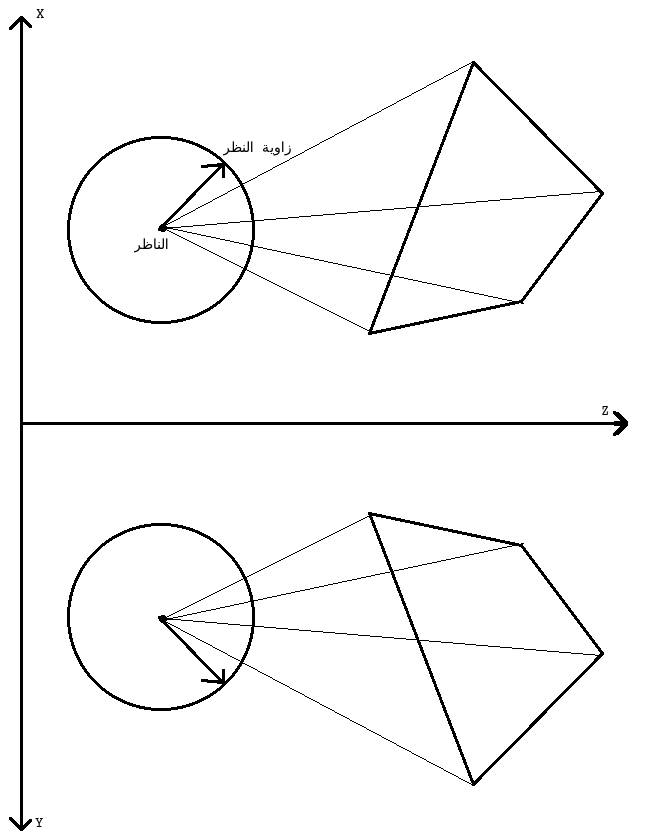
أردت أن أدخل في مجال برمجة الألعاب الثلاثية الأبعاد عن طريقة لغة جافا و قمت بعمل نموذج جيد و قد عمل معي جيداً و كان أصله هذه القوانين
post-112912-1213755157_thumb.jpg

كما ترون هذه صورة لمسطح من الجنب و من فوق ... المسطح مكون من أربعة نقاط لكل نقطة x و y و z

و النقطة الموجودة داخل الدائرة هي النقطة التي ينظر من عندها اللاعب

إذا تحدثنا على الورقة و القلم فنحن سنرسم خط يصل ما بين كل نقطة و مركز الدائرة ثم نحسب طول المنحنى الذي بين زاوية النظر و نقطة تقاطع الخط مع الدائرة

طبعاً سيتم حساب الزاوية التي يحدثها كل خط عن طريق دالة Math.atan و سيكون معلوم لدينا زاوية النظر لأنها عبارة عن متغير تتغير قيمته بتحرك الفأرة

و سنحسب الفرق بين الزاويتين ثم نحسب طول المنحنى عن طريق ضرب الزاوية في نصف القطر (إذا كانت الزوايا بالradian و ليس degree(

و هكذا نحول الx و الy و الz الموجودين لكل نقطة إلى x و y يظهرون على الشاشة

طبعاً الموضوع فيه تفاصيل أكثر

لكني قلت هل أنا أول من إخترع كائنات الرسم الثلاثي الأبعاد في الجافا ؟؟؟

أكيد هناك كائنات للرسم الثلاثي الأبعاد موجودة يمكن إستخدامها مباشرةً

بحثت في النت طبعاً وجدت كائنات opengl و لكن عندما جربتها وجدت أولاً أن الclasses التي عملت لها import غير موجودة ..

فالسؤال هنا هو من أين أحصل عليها و كيف أجعلها تعمل عند الشخص الذي سيلعب اللعبة بعد ذلك على أي حاسب آخر

و السؤال الثاني .. ً ما الحل مع كروت الشاشة السيئة البطيئة المستهلكة ... ؟؟؟

هل هناك classes للرسم الثلاثي الأبعاد يبتعد عن موضوع التسريع الثلاثي الأبعاد الذي يحدث مشاكل مع كروت الشاشة السيئة ؟؟

تم تعديل هذه المشاركة بواسطة omar_cplusplus في 18 يونيو 2008 في 05:13

#2

سلام أخوي فعلا هناك للرسم الثلاثي الأبعاد API 3D

Welcome to the JOGL API Project

The JOGL project hosts the development version of the Java™ Binding for the OpenGL® API (JSR-231), and is designed to provide hardware-supported 3D graphics to applications written in Java. JOGL provides full access to the APIs in the OpenGL 2.0 specification as well as nearly all vendor extensions, and integrates with the AWT and Swing widget sets. It is part of a suite of open-source technologies initiated by the Game Technology Group at Sun Microsystems. ...

من هنا الحل

https://jogl.dev.java.net/

image-27.gif

concepteur realisateur java j2ee

php5 and asp

#3

كيف أقوم بوضع تلك ملفات الclasses هل أفك ضغط ملفات joal-1.1.0-b04-src.tar.gz و jutils-1.1.0-b04-src.tar.gz و jogl-1.1.0-b04-src.tar.gz و jinput-1.1.0-b04-src.tar.gz في المجلد الموجود فيه البرنامج الذي أعمله أم أين أضع الclasses ؟؟

#4

تنزيل ارشيف الرمز البريدي للبيئة التشغيل الخاصة بك (على سبيل المثال ، jogl - [الاصدار] - ويندوز - i586.zip) وunzip. تعديل classpath الخاص بك متغير البيئة لتشمل كامل لمسارات jogl.jar وgluegen - rt.jar ؛ على سبيل المثال ، ". ؛ ج : \ بعض \ الاخرى \ حزمة \ foo.jar ؛ ج : \ المستخدمين \ myhome \ jogl -] الاصدار] - ويندوز - i586 \ مكتبه \ jogl.jar ؛ ج : \ المستخدمين \ myhome \ jogl - [الاصدار] - ويندوز - i586 \ مكتبه \ rt.jar - gluegen ". (اذا لم تكن قد حددت في السابق classpath متغير البيئة ، قد ترغب في التأكد من ان "." ، والدليل الجاري ، على classpath الجديد الخاص بك.) تعديل مسار متغير البيئة الخاصة بك (ويندوز) ، ld_library_path متغير البيئة (لينكس وسولاريس (، او dyld_library_path متغير البيئة (ماكنتوش) لاحتواء كامل الطريق الى "ليب" دليل ، فعلى سبيل المثال ، على النوافذ ، تضاف عبارة "ج : \ المستخدمين \ myhome \ jogl - [الاصدار] - ويندوز - i586 \ ليب" الطريق الى حسابك في استخدام هذا النظام لوحة التحكم ، من علامة التبويب خيارات متقدمة ، ومتغيرات البيئة زر. وعند هذه النقطه تركيب جافا الذي لديك ينبغي ان يكون قادرا على رؤية jogl الدرجة الملفات. مستخدمي ides مثل netbeans الكسوف وينبغي ان يتشاور مع بيئة تطوير متكاملة وثائق لترى كيف جرة اضافة الى الملفات والمكتبات الوطنية الى المشروع الحالي.

اسقاط jogl المكتبه الوطنية وجره الى التمديد للدليل هو jre بشدة. وبذلك يمكن ان تتسبب في صراعات مع طرف ثالث تطبيقات جافا اطلقت عبر الانترنت ابدا ، واسباب البلبله في وقت لاحق عندما رفع مستوى التوزيع.

تم تعديل هذه المشاركة بواسطة man4maya في 19 يونيو 2008 في 04:29

image-27.gif

concepteur realisateur java j2ee

php5 and asp

#5

أخي man4maya

يظهر لي أنك تستخدم الوافي للترجمة

من اللغة الإنجليزية

فهلا وضعت النص الأصلي

لأن الترجمة أفسدت المعنى

تحياتي

حزمة المحرك الإصدارة 0.8

أي أحد يجد أني ظلمته فليراسلني

وبإذن الله لو كان له حق سيأخذه

728x90.png

#6

يعني أنا الآن عندي مثلاً مجلد هذا مساره

/media/hdb1/opengl/MyApp.java

هل يكون مجلد الclasses هو

/media/hdb1/opengl/net/java/games/jogl/

أم أن تلك الملفات توضع في مكانٍ ما في ملفات النظام ؟؟

و أين أضع بقية حزم ؟؟

#7

Setting up JOGL Programming Enviornment

(on Windows as an example)

Jim X. Chen; August 2007

JOGL provides full access to the APIs in OpenGL specification as well as nearly all vendor extensions. To install and run JOGL, we need to install Java Development Kit. In addition, a Java IDE is also preferred to help coding. The following steps will guide you through installing Java, JOGL, and Eclipse, jGrasp, or JBuilder IDE.

Installing Java Development Kit

Java Development Kit (JDK) contains a compiler, interpreter, and debugger. If you have not installed JDK, it is freely available from Sun Microsystems. You can download the latest version from the download section at http://java.sun.com. Make sure you download the JDK Java SE (Standard Edition) not the JRE (runtime environment) that matches the platform you use. After downloading the JDK, you can run the installation executable file. During the installation, you will be asked the directory "Install to:". You need to know where it is installed. For example, you can put it under: "C:\myJDK\". In default, it is put under "C:\Program Files\Java\jdkxxx\".

Installing JOGL

We need to obtain the binaries in order to compile and run applications. Downlaod the current release build binaries that match the platform you use. After that, you can extract and put all these files (jar and dll files) in the same directory with the Java (JOGL) examples and compile all them on the command line in the current directory with:

"C:\myJDK\bin\javac" -classpath jogl.jar *.java

After that, you can run the sample program with (the command in one line):

"C:myJDK\bin\java" -classpath .;jogl.jar;gluegen-rt.jar; -Djava.library.path=. J1_0_Point

That is, you need to place the "*.jar" files in the CLASSPATH of your build environment in order to be able to compile an application with JOGL and run, and place "*.dll" files in the directory listed in the "java.library.path" environment variable during execution. Java loads the native libraries (such as the dll files for Windows) from the directories listed in the "java.library.path" environment variable. For Windows, placing the dll files under "C:\WINDOWS\system32\" directory works. This approach gets you up running quickly without worrying about the "java.library.path" setting.

Installing a Java IDE (Eclipse, jGRASP, or JBuilder)

Installing a Java IDE (Integrated Development Environment) is strongly recommended. Without an IDE, you can edit Java program files using any text editor, compile and run Java programs using the commands we introduced above after downloading JOGL, but that would be very difficult and slow. Java IDEs such as JBuilder, Eclipes, and jGRASP are development environments that make Java programming much faster and easier.

If you use Eclipse, you can put "*.jar" files under "Project->Properties->Libraries". You can download from http://eclipse.org the latest version of Eclipse that matches the platform you use. Expand it into the folder where you would like Eclipse to run from, (e.g., "C:\eclipse\"). There is no installation to run. To remove Eclipse you simply delete the directory, because Eclipse does not alter the system registry.

If you use jGRASP, in the project under "Settings->PATH/CLASSPATH->Workspace", you can add the directory of the *.dll files to the system PATH window, and add "*.jar" files with full path to the CLASSPATH window.

You can download a free version of JBuilder from http://www.borland.com/jbuilder/. JBuilder comes with its own JDK. If you use JBuilder as the IDE and want to use your downloaded JDK, you need to start JBuilder, go to "Tools->Configue JDKs", and click "Change" to change the "JDK home path:" to where you install your JDK. For example, "C:\myJDK\". Also, under "Tools->Configue JDKs", you can click "Add" to add "*.jar" files from wherever you save it to the JBuilder environment.

Creating a Sample Program in Eclipse

As an example, here we introduce using Eclipse. After downloading it, you can run it to start programming. Now in Eclipse you click on "File->New->Project" to create a new Java Project at a name you prefer. Then, you click on "File->New->Class" to create a new class with name: "J1_0_Point". After that, you can copy the following code into the space, and click on "Run->Run As->Java Application" to start compiling and running. You should see a window with a very tiny red pixel at the center. In the future, you can continue creating new classes, as we introduce each example as a new class. As an alternative, you can download the new examples from: joglExamples2007

http://www.cs.umd.edu/~meesh/kmconroy/JOGLTutorial/

and

http://today.java.net/pub/a/today/2003/09/11/jogl2d.html

تم تعديل هذه المشاركة بواسطة man4maya في 20 يونيو 2008 في 18:59

image-27.gif

concepteur realisateur java j2ee

php5 and asp

مواضيع مشابهة