السلام عليكــم ورحمـة الله وبركاتــه ،،
اخواني في المنتدى لدي استفسار بسيط حول Billboard in direct3d
ممكن شرحها ماهي مع مثال
فمشاريع Directx SDK For c++
لاتعمل معي
السلام عليكــم ورحمـة الله وبركاتــه ،،
اخواني في المنتدى لدي استفسار بسيط حول Billboard in direct3d
ممكن شرحها ماهي مع مثال
فمشاريع Directx SDK For c++
لاتعمل معي
وعليكم السلام .
الهدف منها باختصار .. هو اضافة صور sprites ثنائية الابعاد في عالم ثلاثي الابعاد بحيث دائما الصور تتجه وتنظر الى الكاميرا ..
ويعتمدون في ذلك على حسابات في المتجهات ..
من التطبيقات عليها .. رسم شجرة ثنائية الابعاد في عالم ثلاثي الابعاد .. الشجرة ستبدو دائما ثلاثية الابعاد .. لانها تدور .. كلما تغيرت خصائص الكاميرا ..
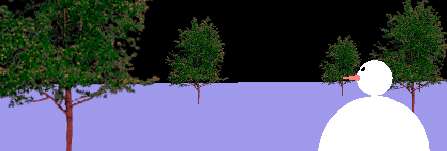
في OpenGL يمكن محاكاة ذلك .. بخطوات بسيطة في مصفوفة modelview .. قد يمكنك عمل ذلك في Dx .
 تطبيق طمأنينة ، نسخة بيتا على أندرويد
عبدالله الشمّري - Al-Shammari
twitter @abshammeri
abshammeri AT gmail.com
github : abshammeri
السلام عليكــم ورحمـة الله وبركاتــه ،،
شكرا أخي ممكن مثال عن ذلك في Directx
السلام عليكــم ورحمـة الله وبركاتــه ،،
يمكنك إستخدام هذه الكلاس من صنعي
هذا كود الكلاس
Billboard.h
float g_fSpinX = 0.0f;

float g_fSpinY = 0.0f;

inline DWORD FtoDW( FLOAT f ) { return *((DWORD*)&f); }

struct Vertex

{

D3DXVECTOR3 posit;

D3DCOLOR color;


enum FVF

{

FVF_Flags = D3DFVF_XYZ|D3DFVF_DIFFUSE

};

};


class EBillboard{

public:

LPDIRECT3DVERTEXBUFFER9 g_pVertexBuffer;

LPDIRECT3DTEXTURE9 g_pTexture;

D3DXVECTOR3 m_vCurPos;

D3DXVECTOR3 m_vCurVel;

D3DCOLOR m_vColor;

int a;

D3DMATERIAL9 g_meshMaterial;

void initPointSprites( void )

{

//

// Load up the point sprite's texture...

//

//a=1;


ZeroMemory( &g_meshMaterial, sizeof(D3DMATERIAL9) );

g_meshMaterial.Diffuse.r = 1.0f;

g_meshMaterial.Diffuse.g = 1.0f;

g_meshMaterial.Diffuse.b = 1.0f;

g_meshMaterial.Diffuse.a = 1.0f;

g_meshMaterial.Ambient.r = 1.0f;

g_meshMaterial.Ambient.g = 1.0f;

g_meshMaterial.Ambient.b = 1.0f;

g_meshMaterial.Ambient.a = 1.0f;


D3DXCreateTextureFromFile( DXUTGetD3D9Device(), L"smoke.bmp", &g_pTexture );


DXUTGetD3D9Device()->SetSamplerState(0, D3DSAMP_MINFILTER, D3DTEXF_LINEAR);

DXUTGetD3D9Device()->SetSamplerState(0, D3DSAMP_MAGFILTER, D3DTEXF_LINEAR);


//

// Create a vertex bufer which can be used with point sprites...

//


DXUTGetD3D9Device()->CreateVertexBuffer( 2048 * sizeof(Vertex),

D3DUSAGE_DYNAMIC | D3DUSAGE_WRITEONLY | D3DUSAGE_POINTS,

Vertex::FVF_Flags, D3DPOOL_DEFAULT,

&g_pVertexBuffer, NULL );


//

// If you want to know the max size that a point sprite can be set to,

// and whether or not you can change the size of point sprites in hardware

// by sending D3DFVF_PSIZE with the FVF, do this.

//


float fMaxPointSize = 10.0f;

bool bDeviceSupportsPSIZE = false;


D3DCAPS9 d3dCaps;

DXUTGetD3D9Device()->GetDeviceCaps( &d3dCaps );


fMaxPointSize = d3dCaps.MaxPointSize;


if( d3dCaps.FVFCaps & D3DFVFCAPS_PSIZE )

bDeviceSupportsPSIZE = true;

else

bDeviceSupportsPSIZE = false;


//

// Initialize our particles so they'll start at the origin with some

// random direction and color.

//


m_vCurPos = D3DXVECTOR3(0.0f,0.0f,0.0f);

m_vCurVel = D3DXVECTOR3(0.0f,0.0f,0.0f);


m_vColor = D3DCOLOR_COLORVALUE( 1,

1,

1,

a );


}


void renderPointSprites( void )

{

//

// Setting D3DRS_ZWRITEENABLE to FALSE makes the Z-Buffer read-only, which

// helps remove graphical artifacts generated from rendering a list of

// particles that haven't been sorted by distance to the eye.

//

// Setting D3DRS_ALPHABLENDENABLE to TRUE allows particles, which overlap,

// to alpha blend with each other correctly.

//


DXUTGetD3D9Device()->SetRenderState( D3DRS_ZWRITEENABLE, FALSE );


DXUTGetD3D9Device()->SetRenderState( D3DRS_ALPHABLENDENABLE, TRUE );

DXUTGetD3D9Device()->SetRenderState( D3DRS_DESTBLEND, D3DBLEND_ONE );


//

// Set up the render states for using point sprites...

//


DXUTGetD3D9Device()->SetRenderState( D3DRS_POINTSPRITEENABLE, TRUE ); // Turn on point sprites

DXUTGetD3D9Device()->SetRenderState( D3DRS_POINTSCALEENABLE, TRUE ); // Allow sprites to be scaled with distance

DXUTGetD3D9Device()->SetRenderState( D3DRS_POINTSIZE, FtoDW(2.50) ); // Float value that specifies the size to use for point size computation in cases where point size is not specified for each vertex.

DXUTGetD3D9Device()->SetRenderState( D3DRS_POINTSIZE_MIN, FtoDW(1.0f) ); // Float value that specifies the minimum size of point primitives. Point primitives are clamped to this size during rendering.

DXUTGetD3D9Device()->SetRenderState( D3DRS_POINTSCALE_A, FtoDW(1.0f) ); // Default 1.0

DXUTGetD3D9Device()->SetRenderState( D3DRS_POINTSCALE_B, FtoDW(0.0f) ); // Default 0.0

DXUTGetD3D9Device()->SetRenderState( D3DRS_POINTSCALE_C, FtoDW(1.0f) ); // Default 0.0


//

// Lock the vertex buffer, and set up our point sprites in accordance with

// our particles that we're keeping track of in our application.

//


Vertex *pPointVertices;


g_pVertexBuffer->Lock( 0, 100 * sizeof(Vertex),

(void**)&pPointVertices, D3DLOCK_DISCARD );


pPointVertices->posit = m_vCurPos;

pPointVertices->color = m_vColor;

pPointVertices++;


g_pVertexBuffer->Unlock();


//

// Render point sprites...

//


DXUTGetD3D9Device()->SetStreamSource( 0, g_pVertexBuffer, 0, sizeof(Vertex) );

DXUTGetD3D9Device()->SetFVF( Vertex::FVF_Flags );

DXUTGetD3D9Device()->DrawPrimitive( D3DPT_POINTLIST, 0, 100 );


//

// Reset render states...

//


DXUTGetD3D9Device()->SetRenderState( D3DRS_POINTSPRITEENABLE, FALSE );

DXUTGetD3D9Device()->SetRenderState( D3DRS_POINTSCALEENABLE, FALSE );


DXUTGetD3D9Device()->SetRenderState( D3DRS_ZWRITEENABLE, TRUE );

DXUTGetD3D9Device()->SetRenderState( D3DRS_ALPHABLENDENABLE, FALSE );

}


void Render(){


D3DXMATRIX matTrans;

D3DXMATRIX matRot;

D3DXMATRIX matWorld;


//D3DXMatrixTranslation( &matTrans, m_vCurPos.x ,m_vCurPos.y , m_vCurPos.z );

D3DXMatrixTranslation( &matTrans, 0 ,0 ,0 );

D3DXMatrixRotationYawPitchRoll( &matRot,

D3DXToRadian(g_fSpinX),

D3DXToRadian(g_fSpinY),

0.0f );


matWorld = matRot * matTrans;


// D3DXMatrixScaling( &matTrans, 2 ,2 , 2 );

//matWorld = matTrans * matWorld;

DXUTGetD3D9Device()->SetTransform( D3DTS_WORLD, &matWorld );

DXUTGetD3D9Device()->SetMaterial( &g_meshMaterial );

DXUTGetD3D9Device()->SetTexture( 0, g_pTexture );


renderPointSprites();


HRESULT hr;

V( DXUTGetD3D9Device()->SetLight( 0, &light ) );

V( DXUTGetD3D9Device()->LightEnable( 0, TRUE ) );

DXUTGetD3D9Device()->SetRenderState( D3DRS_LIGHTING, TRUE );

}

};
كود التضمين داخل المشروع :
#include "Billboard.h"
كود تصريح الكلاس:
EBillboard bil
كود تجهيز الكلاس للعمل:
bil.initPointSprites();
كود التصيير(الرسم):
bil.Render();
علما أن DXUTGetD3D9Device() هي مؤشر جهاز الدايركت إكس
أما بالنسبة لموقع الـbillboard فهو هذا المتغير m_vCurPos
هكذا ستخدم:
bil.m_vCurPos = D3DXVECTOR3(0.0f,0.0f,0.0f);
تم تعديل هذه المشاركة بواسطة crazy Programm2007er في 28 سبتمبر 2009 في 00:14