الاخوة الاعزاء السلام عليكم
كيف يمكن ان اعرض ملف html بحيث يظهر مثلما يظهر عند فتحه في الحاسبة ؟؟
ولكم جزيل الشكر :wink:
الاخوة الاعزاء السلام عليكم
كيف يمكن ان اعرض ملف html بحيث يظهر مثلما يظهر عند فتحه في الحاسبة ؟؟
ولكم جزيل الشكر :wink:
تم تعديل هذه المشاركة بواسطة albakri في 25 سبتمبر 2010 في 07:29
اعتقد انك بحاجه الى استخدام Class HTMLComponent
Interface HTMLCallback
الموجودين فى مكتبه الـ LWUIT
يمكنك الاطلاع عليهم من
http://hamzawy.eb2a.com/JME/com/sun/lwuit/html/HTMLComponent.html
http://hamzawy.eb2a.com/JME/com/sun/lwuit/html/HTMLCallback.html
بالتوفيق
السلام عليكم ورحمة الله
الاخ Mahmoud Kelany شكرا على الرد .
فلو تكرمت هل من مثال بسيط ولكم جزيل الشكر
albakri كتب:السلام عليكم ورحمة الله
الاخ Mahmoud Kelany شكرا على الرد .
فلو تكرمت هل من مثال بسيط ولكم جزيل الشكر
تفضل
دا كود الـ HttpRequestHandler
import com.sun.lwuit.html.DocumentInfo;
import com.sun.lwuit.html.DocumentRequestHandler;
import java.io.IOException;
import java.io.InputStream;
import java.io.OutputStream;
import javax.microedition.io.Connector;
import javax.microedition.io.HttpConnection;

public class HttpRequestHandler implements DocumentRequestHandler {

    static String getDomainForLinks(String url) {
        String domain = null;
        if (url.startsWith("file:")) {
            return "localhost"; // Just a common name to store local files under
        }
        int index = -1;
        if (url.startsWith("http://")) {
            index = 7;
        } else if (url.startsWith("https://")) {
            index = 8;
        }
        if (index != -1) {
            domain = url.substring(index);
            index = domain.indexOf('/');
            if (index != -1) {
                domain = domain.substring(0, index);
            }
        }
        return domain;
    }

    public InputStream resourceRequested(DocumentInfo docInfo) {
        InputStream is = null;
        String url = docInfo.getUrl();
        String linkDomain = getDomainForLinks(url);
        String params = docInfo.getParams();
        if ((!docInfo.isPostRequest()) && (params != null) && (!params.equals(""))) {
            url = url + "?" + params;
        }

        try {
            HttpConnection hc = (HttpConnection) Connector.open(url);
            String encoding = null;
            if (docInfo.isPostRequest()) {
                encoding = "application/x-www-form-urlencoded";
            }
            if (!docInfo.getEncoding().equals(DocumentInfo.ENCODING_ISO)) {
                encoding = docInfo.getEncoding();
            }
            String domain = linkDomain;
            domain = domain.substring(domain.indexOf('.'));

            if (encoding != null) {
                hc.setRequestProperty("Content-Type", encoding);
            }

            if (docInfo.isPostRequest()) {
                hc.setRequestMethod(HttpConnection.POST);
                byte[] paramBuf = params.getBytes();
                hc.setRequestProperty("Content-Length", "" + paramBuf.length);
                OutputStream os = hc.openOutputStream();
                os.write(paramBuf);
                os.close();
            }

            String contentTypeStr = hc.getHeaderField("content-type");
            if (contentTypeStr != null) {
                contentTypeStr = contentTypeStr.toLowerCase();
                if (docInfo.getExpectedContentType() == DocumentInfo.TYPE_HTML) { //We perform these checks only for text (i.e. main page), for images/css we just send what the server sends and "hope for the best"
                    if (contentTypeStr != null) {
                        if ((contentTypeStr.startsWith("text/")) || (contentTypeStr.startsWith("application/xhtml")) || (contentTypeStr.startsWith("application/vnd.wap"))) {
                            docInfo.setExpectedContentType(DocumentInfo.TYPE_HTML);
                        } else if (contentTypeStr.startsWith("image/")) {
                            docInfo.setExpectedContentType(DocumentInfo.TYPE_IMAGE);
                            hc.close();
                        } else {
                            hc.close();
                        }
                    }
                }

                if ((docInfo.getExpectedContentType() == DocumentInfo.TYPE_HTML) ||
                        (docInfo.getExpectedContentType() == DocumentInfo.TYPE_CSS)) { // Charset is relevant for HTML and CSS only
                    int charsetIndex = contentTypeStr.indexOf("charset=");
                    if (charsetIndex != -1) {
                        String charset = contentTypeStr.substring(charsetIndex + 8);
                        docInfo.setEncoding(charset.trim());
                    }
                }
            }
            int response = hc.getResponseCode();
            if (response / 100 == 3) { // 30x code is redirect
                String newURL = hc.getHeaderField("Location");
                if (newURL != null) {
                    hc.close();
                    docInfo.setUrl(newURL);
                    return resourceRequested(docInfo);
                }
            }
            is = hc.openInputStream();

        } catch (IOException e) {
            System.out.println("HttpRequestHandler->IOException: " + e.getMessage());
        } catch (IllegalArgumentException e) { // For malformed URL
            System.out.println("HttpRequestHandler->IllegalArgumentException: " + e.getMessage());
        }
        return is;
    }
}
دا كود الـ MIDlet
public class HTMLMidlet extends MIDlet {

    public void startApp() {
        Display.init(this);
        HttpRequestHandler handler = new HttpRequestHandler();
        HTMLComponent htmlC = new HTMLComponent(handler);
        htmlC.setPage("http://www.facebook.com");

        Form form = new Form("MyTitle");
        form.setLayout(new GridLayout(1, 1));
        form.addComponent(htmlC);
        form.show();
    }

    public void pauseApp() {
    }

    public void destroyApp(boolean unconditional) {
    }
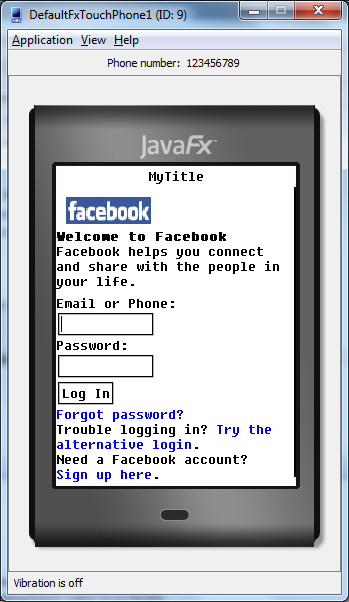
}
شكرا اخ Mahmoud Kelany على الرد لكن الكود لم يعمل عندي سوف ارفق الملفين لترى الخطأ.
اذا تكرمت ارفق الملفات بشكل متكامل لتجربتها :wink:
واذا اردت فتح اي ملف بأمتداد html l موجود في جهازي فهل يعمل هذا الكود؟؟؟وماذا يمكن ان نغير ؟؟؟
تم تعديل هذه المشاركة بواسطة albakri في 28 سبتمبر 2010 في 16:13
albakri كتب:شكرا اخ Mahmoud Kelany على الرد لكن الكود لم يعمل عندي سوف ارفق الملفين لترى الخطأ.
اذا تكرمت ارفق الملفات بشكل متكامل لتجربتها :wink:
واذا اردت فتح اي ملف بأمتداد html l موجود في جهازي فهل يعمل هذا الكود؟؟؟وماذا يمكن ان نغير ؟؟؟
دا بيتعامل مع المكتبه LWUIT وليس المكتبه العاديه اللى هيا lcdui
لذلك لابد من اضافه ملف المكتبه LWUIT الى المشروع
والا سوف تجد الكود كله عباره عن خطوط حمراء
هذه هى المكتبه للتحميل
بالتوفيق
الاخ Mahmoud Kelany قمت بأضافة المكتبة وظهر عند خطأ واحد وسوف ارفق الملفين؟؟؟
والخطأ هو
Compiling 2 source files to C:\Users\Administrator\Desktop\projct\HTMLMidlet\build\compiled
C:\Users\Administrator\Desktop\projct\HTMLMidlet\src\HTMLMidlet.java:15: cannot find symbol
symbol  : class GridLayout
location: class HTMLMidlet
        form.setLayout(new GridLayout(1,1));
1 error
والخطأ هنا
form.setLayout(new GridLayout(1,1));
ولم تجبني عن
اقتباسواذا اردت فتح اي ملف بأمتداد html l موجود في جهازي فهل يعمل هذا الكود؟؟؟وماذا يمكن ان نغير ؟؟؟
تم تعديل هذه المشاركة بواسطة albakri في 29 سبتمبر 2010 في 15:52
بص الخطا بتاعك ان لم تضف الـ import الخاص بالـ GridLayout
import com.sun.lwuit.layouts.GridLayout;
لذلك هو غير متعرف على الـ
form.setLayout(new GridLayout(1, 1));
بعد اضافه الـ import الخاص بالـ GridLayout
يعمل بشكل سليم
بالنسبه هل يعمل على ملف على الجهاز
لم يعمل على ملف على جهاز الكمبيوتر
لكن قد يعمل على ملف على الموبيل
يعنى صفحه HTML محفوظه على الموبيل
انا مش عملت الـ HttpRequestHandler
دى انا واخدها من الـ LWUITBrowser
لانها كانت اول مره اتعامل مع الـ HTMLComponent
لماذا قولت قد تعمل على صفحه محفوظه على الموبيل
انظر الى هذا الكود الخاص بـHttpRequestHandler
 static String getDomainForLinks(String url) {
        String domain = null;
        if (url.startsWith("file:")) {
            return "localhost"; // Just a common name to store local files under
        }
        int index = -1;
        if (url.startsWith("http://")) {
            index = 7;
        } else if (url.startsWith("https://")) {
            index = 8;
        }
        if (index != -1) {
            domain = url.substring(index);
            index = domain.indexOf('/');
            if (index != -1) {
                domain = domain.substring(0, index);
            }
        }
        return domain;
    }
بالتوفيق
اردت مساعدتك فقط
تم تعديل هذه المشاركة بواسطة Mahmoud Kelany في 29 سبتمبر 2010 في 17:58
شكرا لك اخ Mahmoud Kelany وجزاك الله خير .
وعذرا لاخذ وقتك النتيجة عندي ظهرت كما في الصور المرفقة
انا اريد ان اقوم بتشغيل اي ملف ذات امتداد html وحتما الملف موجود في الموبايل ولكن من غير الارتباط بالانترنت حتى.
الان برأيك لو اردت تشغيل ملف e:\test.html اين اضع اسمه في الكود انا جرب ولم ينفع.
مرة اخرى اجدد شكر لك
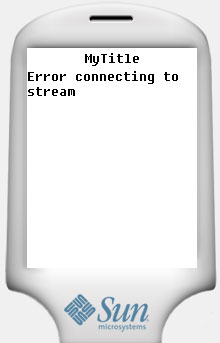
تم تعديل هذه المشاركة بواسطة albakri في 30 سبتمبر 2010 في 09:26
albakri كتب:شكرا لك اخ Mahmoud Kelany وجزاك الله خير .
وعذرا لاخذ وقتك النتيجة عندي ظهرت كما في الصور المرفقة
انا اريد ان اقوم بتشغيل اي ملف ذات امتداد html وحتما الملف موجود في الموبايل ولكن من غير الارتباط بالانترنت حتى.
الان برأيك لو اردت تشغيل ملف e:\test.html اين اضع اسمه في الكود انا جرب ولم ينفع.
مرة اخرى اجدد شكر لك
العفو اخى الكريم تحت امرك
وجزانا واياكم كل خير
بالنسبه للنتيجه لا الموقع شغال زى ما انا وريتك فالصوره
انما بالنسبه للصفحات المحفوظه بجد لا اعلم جربت ولكن لم تعمل