الفريق العربي للبرمجةأرشيف المنتديات · 2000 – 2023
نسخة أرشيفية للقراءة فقط — التسجيل والمشاركة مغلقان، والمحتوى محفوظ كما كان.

مشكل في jframe

بدأه mohammeding في 19 مارس 2011 · 8 رد · 551 مشاهدة · في JavaSE
مشاركة: واتساب X فيسبوك تيليجرام
#1 صاحب الموضوع

السلام عليكم

لدي سؤال عن جافا

لقد تعبت من تتبع المشكل حوالي شهر و أنا أتتبع مشكل ولكن 0

مشكلتي هي حاليا أقوم بتطوير برنامج محاكات petri net

أنه عندما أقوم بتحريك jframe إلى اليمين أو اليسار تمسح جرافيك الموجودة على jpanel

بصراحة أريد أن أعرف ماهية المشكل وين يقع مشكل بمعنى أخر أريد تعريف للمشكلة

كما هو موضح في الصورة التالية
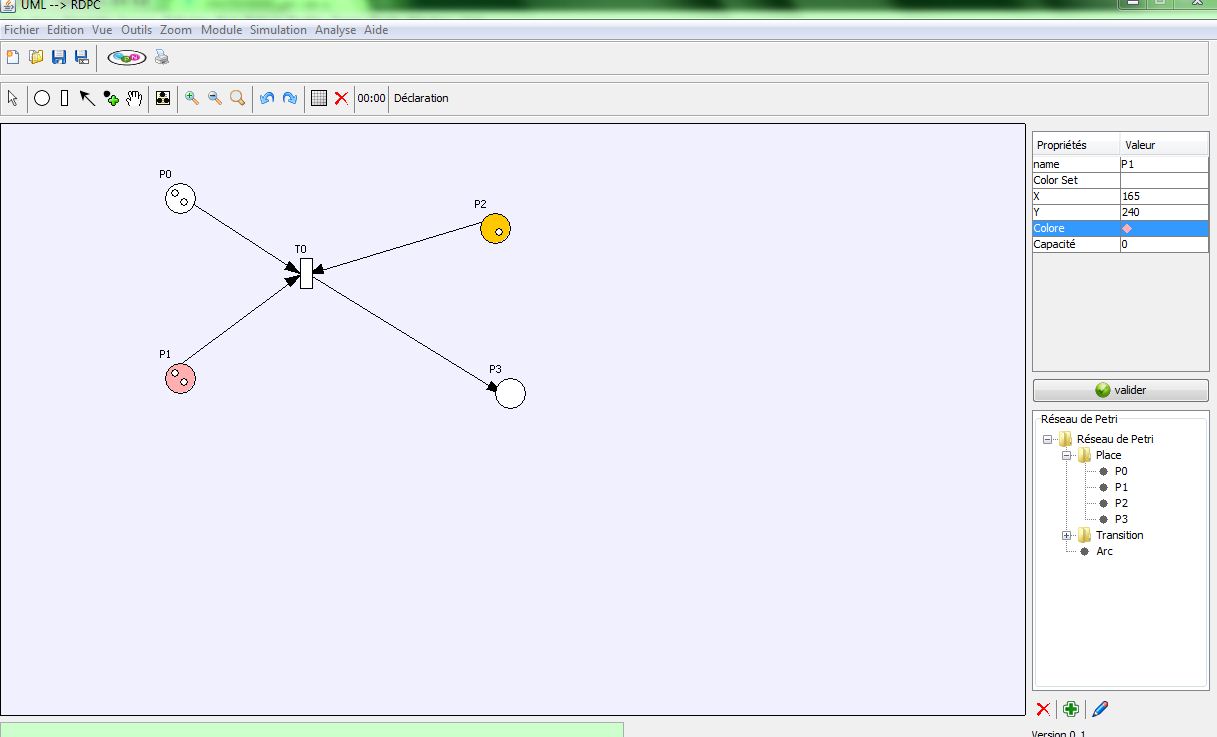
post-163892-086722600 1300480426_thumb.j

أرجو المساعدة منكم

المرفقات
Capture.JPG
#2

هل تستخدم دالة paint في الكود؟

أم دالة paintComponent؟

عفواً أحبتي انقطاعي بسبب الدراسة دعواتكم بالتوفيق..

{ لا ينال العلم مستحٍ ولا مستكبر }

#3

لا أستخدم paint و لا paintComponent

قمت بتصميم كلاس خاصة للرسم و أقوم بي إستدعائها في حالة الرسم

#4

ضع الكود الخاص بالرسم

عفواً أحبتي انقطاعي بسبب الدراسة دعواتكم بالتوفيق..

{ لا ينال العلم مستحٍ ولا مستكبر }

#5

كود الخاص برسم

يرسم Place Transition Arc et Token

import java.awt.*;
import java.awt.geom.*;
public class Paint_Petri
{
    Calcul Traitement=new Calcul();
     public void draw_Place(int x,int y,String Name,int jeton,Color coleur,Graphics g)
    {
                    paint_P(g,x,y,jeton,Name,coleur);
    }
    private void paint_P(Graphics g,int x,int y,int jeton,String Name,Color coleur)
    {
                    Color c = g.getColor();
                    g.setColor(coleur);
                    g.fillOval(x,y,30,30);
                    g.setColor(Color.black);
                    g.drawOval(x,y,30,30);
                    g.drawString(Name, x-5, y-5);
                    paint_jeton(g,x,y,jeton);
                    g.setColor(c);

    }
    private void paint_jeton(Graphics g,int x,int y,int jeton)
    {
        if (jeton==1)
        {
            g.setColor(Color.white);
            g.fillOval(x+15,y+15,7,7);
            g.setColor(Color.black);
            g.drawOval(x+15,y+15,7,7);
        }
        if (jeton==2)
        {
            g.setColor(Color.white);
            g.fillOval(x+15,y+15,7,7);
            g.setColor(Color.black);
            g.drawOval(x+15,y+15,7,7);
            g.setColor(Color.white);
            g.fillOval(x+6,y+6,7,7);
            g.setColor(Color.black);
            g.drawOval(x+6,y+6,7,7);
        }
        if (jeton==3)
        {
            g.setColor(Color.white);
            g.fillOval(x+15,y+15,7,7);
            g.setColor(Color.black);
            g.drawOval(x+15,y+15,7,7);
            g.setColor(Color.white);
            g.fillOval(x+6,y+6,7,7);
            g.setColor(Color.black);
            g.drawOval(x+6,y+6,7,7);
            g.setColor(Color.white);
            g.fillOval(x+15,y+6,7,7);
            g.setColor(Color.black);
            g.drawOval(x+15,y+6,7,7);
        }
        if (jeton==4)
        {
            g.setColor(Color.white);
             g.fillOval(x+15,y+15,7,7);
             g.setColor(Color.black);
             g.drawOval(x+15,y+15,7,7);
             g.setColor(Color.white);
            g.fillOval(x+6,y+6,7,7);
            g.setColor(Color.black);
            g.drawOval(x+6,y+6,7,7);
            g.setColor(Color.white);
            g.fillOval(x+15,y+6,7,7);
            g.setColor(Color.black);
            g.drawOval(x+15,y+6,7,7);
            g.setColor(Color.white);
            g.fillOval(x+6,y+15,7,7);
            g.setColor(Color.black);
            g.drawOval(x+6,y+15,7,7);

        }
        if (jeton==0)
        {

        }
        if (jeton>4 && jeton<10)
        {
            g.setColor(Color.BLACK);
            Font fo=g.getFont();
//            Font fonte = new Font(" TimesRoman ",Font.BOLD,14);
//            g.setFont(fonte);
            g.drawString(String.valueOf(jeton), x+13, y+18);
            g.setFont(fo);
        }
        if (jeton>=10)
        {
            g.setColor(Color.BLACK);
            Font fo=g.getFont();
//            Font fonte = new Font(" TimesRoman ",Font.BOLD,14);
//            g.setFont(fonte);
            g.drawString(String.valueOf(jeton), x+11, y+18);
            g.setFont(fo);
        }

    }
    public void draw_Transition(int x,int y,String Name,Graphics2D  g)
    {
                    paint_T(g,x,y,Name);
    }
    private void paint_T(Graphics2D g,int x,int y,String Name)
    {

                    Color c = g.getColor();
                    g.setColor(Color.white);
                    g.fillRect(x,y,12,30);
                    g.setColor(Color.BLACK);
                    g.drawRect(x,y,12,30);
                    g.drawString(Name, x-5, y-5);
                    g.setColor(c);
    }
    public void draw_arc(Graphics2D g, int xS, int yS, int xE, int yE,boolean orientation)
    {
                    int[] tab=new int[4];
                    tab[0]=Traitement.Meilluer_Point(xS,yS,xE,yE,orientation)[0];
                    tab[1]=Traitement.Meilluer_Point(xS,yS,xE,yE,orientation)[1];
                    tab[2]=Traitement.Meilluer_Point(xS,yS,xE,yE,orientation)[2];
                    tab[3]=Traitement.Meilluer_Point(xS,yS,xE,yE,orientation)[3];
                    draw_Arc(g,tab[0],tab[1],tab[2],tab[3]);
    }
    private static void draw_Arc(Graphics2D g, int xS, int yS, int xE, int yE)
    {
                    int xP[] = new int[3];
                    int yP[] = new int[3];
                    if (xE < 0.0)
                        xP[0] = (int) (xE - 1.0);
                    else
                        xP[0] = (int) (xE + 1.0);
                    if (yE < 0.0)
                        yP[0] = (int) (yE - 1.0);
                    else
                        yP[0] = (int) (yE + 1.0);
                    double  dx = xS - xE;
                    double  dy = yS - yE;
                    double  length = Math.sqrt(dx * dx + dy * dy);
                    double  xAdd = 16 * dx / length;
                    double  yAdd = 16 * dy / length;
                    xP[1] = (int) Math.round (xE + xAdd - (yAdd / 3.0));
                    yP[1] = (int) Math.round (yE + yAdd + (xAdd / 3.0));
                    xP[2] = (int) Math.round (xE + xAdd + (yAdd / 3.0));
                    yP[2] = (int) Math.round (yE + yAdd - (xAdd / 3.0));
                    Font fo=g.getFont();
//                    Font fonte = new Font(" Dialog ",Font.ITALIC,100);
//                    g.setFont(fonte);
                    Color c = g.getColor();
                    g.setColor(Color.black);
                    g.fillPolygon(xP, yP, 3);
                    g.draw(new Line2D.Double(xS, yS, xP[0], yP[0]));
      }
}
#6

هذه الشيفرة لوحدها لا يمكن لها أن ترسم أبداً

من أين لكن بالكائن Graphics

هذا هو مربط الفرس

تحياتي

حزمة المحرك الإصدارة 0.8

أي أحد يجد أني ظلمته فليراسلني

وبإذن الله لو كان له حق سيأخذه

728x90.png

#7

أقوم بتمريره عبر كلاس أخرى

مثلا

public static Graphics g  ;

g  = jPanel1.getGraphics();

مثلا

 transition.draw_Transition(100,100,T0,(Graphics2D ) g);
#8

لا أعلم أسلوب إنشاء كائن graphics في swing

هل يتم تحديثه كل فترة هل يبقى على ما هو عليه

هذه تفاصيل تتعلق بـ rendering

ويبدو أنك تأخذ الكائن وتضعه لديك وتتعامل معه

كما يبدو أن swing تغير الكائن كل فترة والثانية (لا أعرف معايير معينة لذلك)

لكني أنصحك بتغيير الكائن قبل العمل عليه getGraphics مرة أخرى هذا قد يحل المشكلة

وإن كنت أفضل اتباع النمط الخاص بعملية تخصيص مكونات swing ألا وهو paintComponent

تحياتي

حزمة المحرك الإصدارة 0.8

أي أحد يجد أني ظلمته فليراسلني

وبإذن الله لو كان له حق سيأخذه

728x90.png

#9

نعم يأخي يبدو المشكل للآنني لا أستعمل paintComponent

بعد إطلاعي على هذا المقال عرفت المشكل أنه لعدم إستعمالها

اقتباس

Who calls paintComponent

When you subclass JComponent or JPanel to draw graphics, override the paintComponent() method. This method is called because the user did something with the user interface that required redrawing, or your code has explicitly requested that it be redrawn.

Called automatically when it becomes visible

When a window becomes visible (uncovered or deminimized) or is resized, the "system" automatically calls the paintComponent() method for all areas of the screen that have to be redrawn.

Called indirectly from a user-defined listener via repaint()

When a listener (mouse, button, keyboard, ...) of yours is called, the listener code often makes changes that should be displayed in your graphics area. Never call paintComponent() method directly.

Change instance variables. The listener code should set instance variables that paintComponent() uses in drawing the panel. After changing the values, the next time paintComponent() is called, these new values will be used. But you won't want to wait for a call to paintComponent(), call repaint().

Call repaint(). The repaint() method consolidates all requests to change the component (there may be several repaint requests between screen refreshes). It adds an update request to the GUI event queue so that the update will be properly coordinated with other GUI actions (Swing and AWT are not thread-safe). This update request, when processed, calls update(), which calls paint(), which calls your paintComponent() method (as well as calling paintBorder() and paintChildren().

الرابط

h

ttp://leepoint.net/notes-java/GUI-lowlevel/graphics/15who-calls-paintcomponent.html

مواضيع مشابهة