السلام عليكم و رحمة الله و بركاته
منذ فترة بدأت فى تعلم Qt لعمل واجهات رسومية GUI باستخدام لغة C++ و كنت فى البداية اعانى ولا اعرف كيفية عمل اى برنامج غير الامثلة الموجودة فى الكتاب الذى اتعلم منه :confused: و لكن بعد فترة من القراءة قلت ما المانع ان اعمل اول برنامج لى باستخدام هذه المكتبة الرائعة السهلة البسيطة .
فكرة البرنامج :
هدف البرنامج هو حل المعادلات من الدرجة الاولى و الثانية باستخدام Quadratic Formula و هى كالتالى :
LaTeX
الوحدات البرمجية :
البرنامج يتكون من ثلاث وحدات :
- equationsolver.h
- equationsolver.cpp
- main.cpp
شرح الاكواد :
اولا : equationsolver.h
هذا الملف به تعريف الصنف الاساسى فى البرنامج و هو EquationSolver .
كود الوحدة :
- #ifndef EQUATIONSOLVER_H_INCLUDED
- #define EQUATIONSOLVER_H_INCLUDED
- #include<QWidget>
- #include <QtGui>
- class EquationSolver : public QWidget
- {
- Q_OBJECT
- public:
- EquationSolver(QWidget* =0);
- private slots:
- void displayX();
- void clearForm();
- private:
- QLineEdit* lineEditA;
- QLineEdit* lineEditB;
- QLineEdit* lineEditC;
- QLineEdit* lineEditDispX1;
- QLineEdit* lineEditDispX2;
- QPushButton* Calculate;
- QPushButton* Clear;
- double a,b,c;
- double x1,x2;
- double calculateX1(double, double, double);
- double calculateX2(double, double, double);
- };
- #endif // EQUATIONSOLVER_H_INCLUDED
- #include "equationsolver.h"
- #include <QtGui>
- #include <cmath>
- #include <QString>
- EquationSolver::EquationSolver(QWidget* parent)
- {
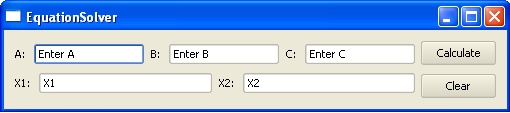
- lineEditA = new QLineEdit("Enter A");
- lineEditB = new QLineEdit("Enter B");
- lineEditC = new QLineEdit("Enter C");
- lineEditDispX1 = new QLineEdit("X1");
- lineEditDispX2 = new QLineEdit("X2");
- Calculate = new QPushButton("&Calculate");
- Clear = new QPushButton("&Clear");
- QHBoxLayout* up = new QHBoxLayout;
- up->addWidget(lineEditA);
- up->addWidget(lineEditB);
- up->addWidget(lineEditC);
- QVBoxLayout* downright = new QVBoxLayout;
- downright->addWidget(Calculate);
- downright->addWidget(Clear);
- QHBoxLayout* downleft = new QHBoxLayout;
- downleft->addWidget(lineEditDispX1);
- downleft->addWidget(lineEditDispX2);
- QHBoxLayout* down = new QHBoxLayout;
- down->addLayout(downleft);
- down->addLayout(downright);
- QVBoxLayout* layout = new QVBoxLayout;
- layout->addLayout(up);
- layout->addLayout(down);
- setWindowTitle("EquationSolver");
- setLayout(layout);
- connect(Calculate, SIGNAL(clicked()), this, SLOT(displayX()));
- connect(Clear, SIGNAL(clicked()), this,SLOT(clearForm()));
- }
- double EquationSolver::calculateX1(double a,double b, double c) //function to compute x1
- {
- double delta, X1, num, den; //data required for calculations
- double bsqr;
- if (a != 0) //quadratic equation
- {
- bsqr = b*b;
- delta = sqrt(bsqr - (4*a*c));
- num = (-1 * b) + delta;
- den = 2*a;
- X1 = num / den;
- return X1;
- }
- else if (a == 0) //linear equation
- {
- X1 = (-c) / b;
- }
- return X1;
- }
- double EquationSolver::calculateX2(double a,double b, double c) //function to compute x1
- {
- double delta, X2, num, den; //data required for calculations
- double bsqr;
- if (a != 0) //quadratic equation
- {
- bsqr = b*b;
- delta = sqrt(bsqr - (4*a*c));
- num = (-1 * b) - delta;
- den = 2*a;
- X2 = num / den;
- return X2;
- }
- else if (a == 0) //linear equation
- {
- X2 = (-c) / b;
- }
- return X2;
- }
- void EquationSolver::displayX()
- {
- QString strA;
- QString strB;
- QString strC;
- QString strX1;
- QString strX2;
- strA = lineEditA->text();
- strB = lineEditB->text();
- strC = lineEditC->text();
- a = strA.toDouble();
- b = strB.toDouble();
- c = strC.toDouble();
- x1 = calculateX1(a,b,c);
- x2 = calculateX2(a,b,c);
- QVariant varX1(x1);
- QVariant varX2(x2);
- strX1 = varX1.toString();
- strX2 = varX2.toString();
- lineEditDispX1->setText(strX1);
- lineEditDispX2->setText(strX2);
- }
- void EquationSolver::clearForm()
- {
- lineEditA->clear();
- lineEditB->clear();
- lineEditC->clear();
- lineEditDispX1->clear();
- lineEditDispX2->clear();
- }
- #include <QApplication>
- #include "EquationSolver.h"
- #include <QPlastiqueStyle>
- int main(int argc, char* argv[])
- {
- QApplication app(argc, argv);
- EquationSolver* pro = new EquationSolver;
- QApplication::setStyle(new QPlastiqueStyle);
- pro->show();
- return app.exec();
- }
هذا كود الدالة الرئيسة main() و هى تحتوى على تعليمات بسيطة جدا &